
Cobblemon Outline
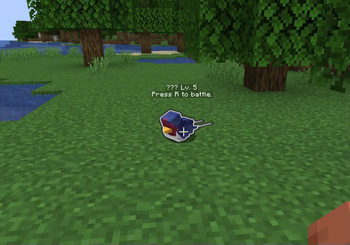
Mod developed for Minecraft (Cobblemon) compatible with both client and server. The mod adds a visual outline around the Pokémon the player is targeting…
⬇ Download on Modrinth


Compatibility: Works on both client and server without causing incompatibilities or performance issues.
Mod Operation Installed on the Client and Server All colors work correctly, allowing you to identify any Pokémon type as listed above.
Installed on the Client Only
The yellow outline (Shiny Pokémon) and white outline (Wild Pokémon) work normally.
Other types (your Pokémon, other players' Pokémon, Mythical, Legendary, and Ultra Beast) will have a white outline as if they were wild Pokémon, except for Shiny Pokémon, which retains the yellow outline.
To identify all categories with their specific colors, the mod must also be present on the server.
This mod adds colored outlines around Pokémon in the world, allowing you to easily identify different types of Pokémon and their properties when targeting them.
Outline Cores White: Wild Pokémon
Green: Your own Pokémon
Red: Other players' Pokémon
Yellow: Shiny Pokémon
Pink: Mystical Pokémon
Purple: Legendary Pokémon
Cyan: Ultra Beast
Notes The outline appears only on Pokémon the player is targeting and within battle range. The system is entirely visual and does not interfere with battle mechanics or Pokémon behavior. For the best experience and color compatibility, install the mod on both the client and server.
Customization This mod allows you to customize the outline colors for each Pokémon type by editing a simple JSON file. You can change the outline color for your Pokémon (or any other type) by modifying the values in the JSON file — no need to restart the server, just use the reload command!
Reload Command Use /cobblemonoutline reload to instantly reload the color configuration from the JSON file.
This command allows you to update outline colors on the fly, both on the server and client (if supported).
Configuration File Example By default, the color configuration file looks like this:
}
  "colorOwner": [0, 255, 80, 255],
  "colorShiny": [255, 255, 0, 255],
  "colorLegendary": [191, 64, 255, 255],
  "colorMythical": [255, 110, 180, 255],
  "colorUltraBeast": [0, 180, 255, 255],
  "colorOwnedByOther": [255, 0, 0, 255],
  "colorDefault": [255, 255, 255, 255]
}
Each value is in the ARGB format: [Alpha, Red, Green, Blue]. You can freely change these values to customize the outline color for each Pokémon type to your preference.
How to Use Edit the JSON file to set your preferred colors for each Pokémon type.
Run /cobblemonoutline reload in-game or on your server console to apply the new colors immediately.
Enjoy your personalized Pokémon outlines!
- Edition: Minecraft Java
- File type: .jar
- Minecraft version listed: 1.21.1
- How to install: Install the matching mod loader (Forge, Fabric or NeoForge) for your Minecraft version. → Download the .jar. → Put it in the .minecraft/mods folder and launch that loader profile.
- Where to get it: Opens on Modrinth — not every file is mirrored on our own servers.
Install steps are the general flow for this file type — How to install Minecraft Java mods & modpacks walks through it step by step.
- Ships as cobblemonoutline-2.0.jar — drop this file into the mods folder
- Download size: 47 KB
- Download link checked 30 Aug 2026 — working
These come from our own check of the pack file, not from the source page.