
CameraHUD
Java mod listed for Minecraft 1.20. File opened and checked on 14 Oct 2026; downloads from the MC Java Mods app on Android.
⬇ Download on Modrinth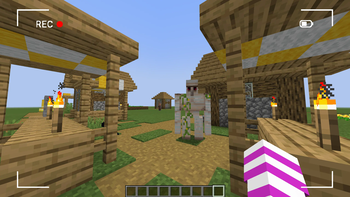
CameraHUD
An immersive Minecraft experience with a simple and effective camera HUD.
Have you always dreamed of an interface that makes you feel like a cameraman in your Minecraft world? CameraHUD adds a minimalist and customizable HUD (Heads-Up Display) that transforms your view.
Features:
Camera HUD: Displays a simple camera interface on your screen, perfect for cinematics or video creation.
Full Control: Adjust the HUD's transparency directly in your mod's configuration file.
Lightweight and Compatible: Designed to run smoothly and be compatible with other mods, CameraHUD is the perfect addition to any adventure.
How It Works:
CameraHUD adds a simple visual effect to your screen in first-person view. It's ideal for those who enjoy building, taking screenshots, or making short films in Minecraft.
Configuration:
The mod generates a configuration file where you can enable or disable the HUD and adjust its opacity.
enableHUD : Enables or disables the HUD.
hudOpacity : Controls the HUD's transparency (from 0 to 255).
- Edition: Minecraft Java
- File type: .jar
- Minecraft version listed: 1.20.1
- How to install: Install the matching mod loader (Forge, Fabric or NeoForge) for your Minecraft version. → Download the .jar. → Put it in the .minecraft/mods folder and launch that loader profile.
- Where to get it: Opens on Modrinth — not every file is mirrored on our own servers.
Install steps are the general flow for this file type — How to install Minecraft Java mods & modpacks walks through it step by step.
- Ships as camerahud-1.0.0.jar — drop this file into the mods folder
- Download size: 9 KB
- Download link checked 21 Nov 2026 — working
These come from our own check of the pack file, not from the source page.