Mob Capture ORB
Java mod listed for Minecraft 1.20. Downloads from the MC Java Mods app on Android.
MobCapture Capture & Release Mobs MobCapture is a small add-on that lets you capture mobs into a portable item and release them later. It is simple to use…
I don't know my version or loader



MobCapture Capture & Release Mobs
MobCapture is a small add-on that lets you capture mobs into a portable item and release them later. It is simple to use and craftable with common materials.
How to capture
- Hold a Capture Orb in your hand.
- Throw it at a mob (use / right-click / tap). If the capture succeeds the mob is removed and you will receive a Release Orb.
How to release
- Select the Release Orb in your hotbar.
- Use it (press use / right-click / tap). The stored mob will spawn near you with a short particle effect.
Crafting
Place 1 Ender Pearl in the center of the crafting grid and surround it with 8 Glass. The recipe produces 4 Capture Orbs.
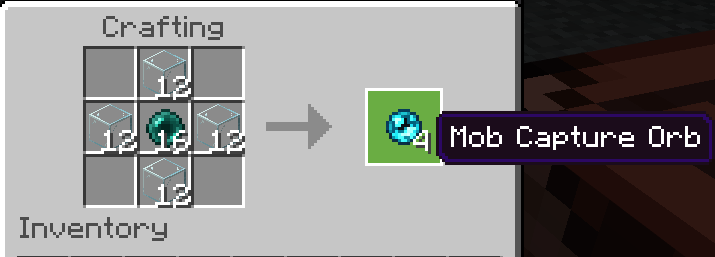
[   ] [ G ] [   ]
[ G ] [ E ] [ G ]
[   ] [ G ] [   ]
Where: G = Glass, E = Ender Pearl
Commands (testing)
/give @s mobcapture:mob_capture_orb 4
/give @s mobcapture:mob_release_orb 1
License: MIT
- Edition: Minecraft Java
- File type: .jar
- Minecraft versions listed: 1.20.1, 1.20.2, 1.20.3
- How to install: Install the matching mod loader (Forge, Fabric or NeoForge) for your Minecraft version. → Download the .jar. → Put it in the .minecraft/mods folder and launch that loader profile.
- Where to get it: Opens on Modrinth — not every file is mirrored on our own servers.
Install steps are the general flow for this file type — How to install Minecraft Java mods & modpacks walks through it step by step.
- Ships as mobcapture-forge-1.0.0.jar — drop this file into the mods folder
- Download size: 42 KB
- Download link checked 11 Oct 2026 — working
These come from our own check of the pack file, not from the source page.