
SimpleChat (fork)
Java mod listed for Minecraft 1.20. Downloads from the MC Java Mods app on Android.
⬇ Download on Modrinth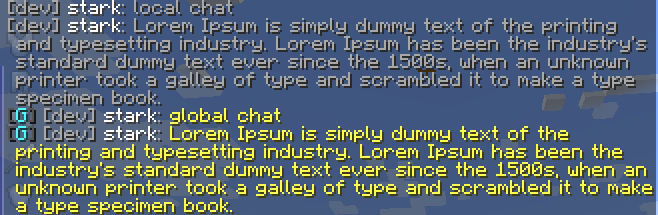
SimpleChat (fork)




This fork was created because the main project is no longer maintained.
A simple chat mod for your server.
Works even in a single player game.
Just use !<message> for global chat or #<message> for world chat!

Features
FTB Teams integration (tested 2001.1.4)
LuckPerms integration (tested 5.4.25)
Global, world and local chat (you can turn it off)
Color chat (you can turn it off)
Reloading the configuration with the command
Support PlacehoderAPI (From 1.19.4)
Added support color tags (Example) (From 1.19.4)
For developers: Player chat event
Configuration
The configuration is located in <game or server directory>/config/simplechat.json.
| Name | Description | Type |
|---|---|---|
| enable_chat_mod | Enables (true) or disables (false) chat handling by the mod. | boolean |
| enable_global_chat | Enables (true) or disables (false) the global chat. | boolean |
| enable_world_chat | Enables (true) or disables (false) the world chat. | boolean |
| enable_chat_colors | Enables (true) or disables (false) the use of color codes in the chat. | boolean |
| local_chat_format | Defines the appearance of the local chat. | String |
| global_chat_format | Defines the appearance of the global chat. | String |
| no_players_nearby_text | Defines a message for local chat when there are no players nearby. | String |
| no_players_nearby_message | Enables (true) or disables (false) message. | boolean |
| no_players_nearby_action_bar | Enables (true) or disables (false) action bar message. | boolean |
| chat_range | Specifies the distance after which local chat messages will not be visible (if global chat is enabled). | int |
{
  "enable_chat_mod": true,
  "enable_global_chat": true,
  "enable_world_chat": false,
  "enable_chat_colors": false,
  "local_chat_format": "%player%&7:&r &7%message%",
  "global_chat_format": "&8[&2G&8] &r%player%&7:&r &e%message%",
  "world_chat_format": "&8[&9W&8] &r%player%&7:&r &e%message%",
  "no_players_nearby_text": "&fNo players nearby. Please use &e!<message> &ffor global chat.",
  "no_players_nearby_message": true,
  "no_players_nearby_action_bar": true,
  "chat_range": 100
}
You can use the placeholder %player% to specify the player's nickname and the placeholder %message% to specify their message in the chat.
%ftbteam%FTB Team integration - display your party in chat.%lp_group%LuckPerms - display player group.%lp_prefix%LuckPerms - display player prefix.%lp_suffix%LuckPerms - display player suffix.
You can reload the configuration without restarting the server or the game using the /simplechat command (requires permission level 1 or more).
API
If you are a developer, you can use an event called when a player writes something to the chat.
Look me.vetustus.server.simplechat.api.event.PlayerChatCallback.
To control the behavior, use the ChatMessage subclass, which can be used to cancel sending a message or change it.
Example:
/**
 * Prohibits players from writing messages by canceling an event.
 */
PlayerChatCallback.EVENT.register((player, message) -> {
  PlayerChatCallback.ChatMessage chatMessage = new PlayerChatCallback.ChatMessage(player, message);
  chatMessage.setCancelled(true);
  return chatMessage;
});
License
The MIT license is used.
- Edition: Minecraft Java
- File type: .jar
- Minecraft version listed: 1.20.1
- How to install: Install the matching mod loader (Forge, Fabric or NeoForge) for your Minecraft version. → Download the .jar. → Put it in the .minecraft/mods folder and launch that loader profile.
- Where to get it: Opens on Modrinth — not every file is mirrored on our own servers.
Install steps are the general flow for this file type — How to install Minecraft Java mods & modpacks walks through it step by step.
- Ships as simplechat-1.9.3.jar — drop this file into the mods folder
- Download size: 190 KB
- Download link checked 11 Oct 2026 — working
These come from our own check of the pack file, not from the source page.