
Pride!
Java mod listed for Minecraft 1.21. Downloads from the MC Java Mods app on Android.
I don't know my version or loader
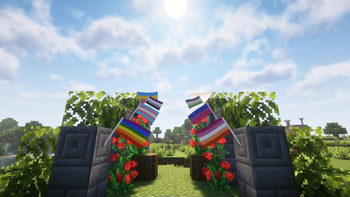

Pride!
Pride Flags? In Minecraft? How queer!
Most flag mods usually have static/simple banner-like designs that (while looking more vanilla,) often feel like they don't draw attention or add a 'living' feeling to builds.
Pride! adds flags that are both responsive to the world's environment and use entity-style directional lighting.

Additionally, two other visual styles can be selected/created (upright, large).
Note: Currently, this contains only a handful (~10 depending on what you consider as being a variant) of pride flags. You can suggest more here!
Environmental
Flags in Pride! use a simple wind/cloth simulation per-flag that reacts based off the current weather. A rainy day will cause flags to sway more aggressively.

Flags can be crafted in any shape with wool, a stick, and string. Right-click to open up a menu to change the flag displayed. These can be placed in an item frame to show up in the world. (the larger, placed variant takes an extra stick to craft.)
Restored Content
Pride! also restores the (effectively removed) Progress Pride Cape and Elytra, which cannot be used in Java Edition even if owned on Bedrock Edition.
Versions 1.6 and later create a settings file at [minecraft folder]/config/flags_config.txt, which allows you to enable this feature and replace capes/elytra (for players with capes, without capes, or just all players) with the Progress Pride version. This also affects mobs wearing elytra when enabled.
Note: your cape is not visible to other players, even when using Pride! on the server-side. This allows the cape replacer to work on vanilla servers.
Modpack Usage
This mod can be added/distributed through any modpack! I've tried to keep rendering code/workarounds detached from other systems, so mod compatibility should be decent.
- Edition: Minecraft Java
- File type: .jar
- Minecraft versions listed: 1.21.9, 1.21.10
- How to install: Install the matching mod loader (Forge, Fabric or NeoForge) for your Minecraft version. → Download the .jar. → Put it in the .minecraft/mods folder and launch that loader profile.
- Where to get it: Opens on Modrinth — not every file is mirrored on our own servers.
Install steps are the general flow for this file type — How to install Minecraft Java mods & modpacks walks through it step by step.
- Ships as flags_fabric-2.0.0.jar — drop this file into the mods folder
- Download size: 646 KB
- Download link checked 11 Oct 2026 — working
These come from our own check of the pack file, not from the source page.