
Hopper Frame
Java mod listed for Minecraft 1.20. Downloads from the MC Java Mods app on Android.
⬇ Download on ModrinthHopper Frame
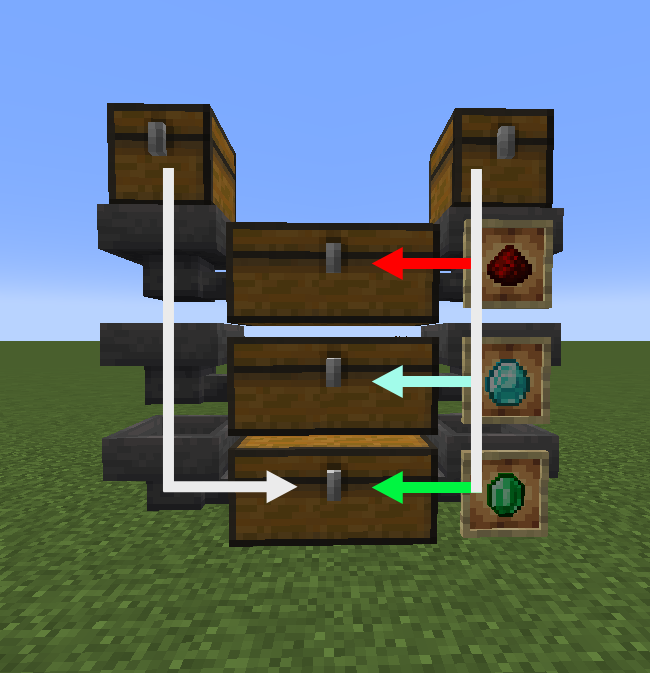
A vanilla friendly mod to help filter items. When attaching an item frame two things change:
- Filter: Whenever the hopper tries to push an item, it will only push what is in the item frame(s) (if empty it can push anything)
- Push priority: Whenever a hopper tries to pull from a filtered hopper it will avoid items that can still be pushed by the filtered hopper.
Vanilla friendly
I personally think this would be a great addition to vanilla minecraft for a couple of reasons. Current filters are very bulky and not very intuitive for most players. Every time I need a filter I will have to look them up, causing me to postpone item sorters in new worlds. Item frames are the perfect fit for filters giving them a good secondary feature, similar to what happened with the decorative pots.
The filtering mechanic is different from the vanilla redstone filter, so this mod is not a drop in replacement. With redstone it filters the pull of a hopper, but this mod filters the push of a hopper. The main practical difference is that pull hoppers can pull from a horizontal line of hoppers, unlike the hopper frames which also pulls unfiltered items. This could mean that the normal filters might be better in some scenarios as the hopper frames require item elevators for every column.
Finally it gives the player control of the item flow through vertical hoppers, with an (empty) item frame the hopper will always push items. Items will only be pulled by the next hopper when it cannot push any more items. Allowing for storage systems that fill top to bottom.
So tldr:
- Intuitive filters
- Not replace/break existing redstone filters
- Add new mechanic (push/pull prio)
- Edition: Minecraft Java
- File type: .jar
- Minecraft version listed: 1.20
- How to install: Install the matching mod loader (Forge, Fabric or NeoForge) for your Minecraft version. → Download the .jar. → Put it in the .minecraft/mods folder and launch that loader profile.
- Where to get it: Opens on Modrinth — not every file is mirrored on our own servers.
Install steps are the general flow for this file type — How to install Minecraft Java mods & modpacks walks through it step by step.
- Ships as hopper-frame-1.20.jar — drop this file into the mods folder
- Download size: 83 KB
- Download link checked 11 Oct 2026 — working
These come from our own check of the pack file, not from the source page.