
ServerPackUnlockerPlus
I don't know my version or loader
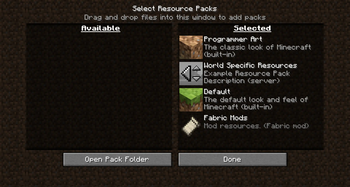
Original Pack has implemented the features in this fork so you are welcome to download the original
Gives Server Resource Packs Vanilla Behavior
By default in Minecraft, Server Resource Packs are pinned and force enabled,
With this mod, Server Resource Packs can be moved in resource pack screen just like regular resource packs,
they can be moved up and down, disabled, enabled or edited (even if the server uses sha1 check).
Resource packs position is saved for each Server individually to a file, so everytime you load into a server,
the resource pack is loaded from the last saved position.
Requires Fabric API
Forked from https://modrinth.com/mod/server-pack-unlocker
Original mod only allows you to move the resource pack up and down,
and after logging off, the resource pack returns to the top.
This fork adds the ability to enable/disable it, and it also saves the position
after logging out or quitting the game, so when you return its in the same position
as you last saved it at.
- Edition: Minecraft Java
- File type: .jar
- Minecraft versions listed: 1.19.3, 1.19.4
- How to install: Install the matching mod loader (Forge, Fabric or NeoForge) for your Minecraft version. → Download the .jar. → Put it in the .minecraft/mods folder and launch that loader profile.
- Where to get it: Opens on Modrinth — not every file is mirrored on our own servers.
Install steps are the general flow for this file type — How to install Minecraft Java mods & modpacks walks through it step by step.
- Ships as spu-1.5.jar — drop this file into the mods folder
- Download size: 115 KB
- Download link checked 31 Aug 2026 — working
These come from our own check of the pack file, not from the source page.