
ModsJava
Ultimate Hud
I don't know my version or loader
Open the Minecraft launcher and look at the profile you play on — it names both, like fabric-loader-1.21.4. The version also shows in the bottom-right corner of the game's main menu.
No loader in the profile name? Then it's plain Minecraft, and these mods won't run — you need Fabric or NeoForge installed first.
Ultimate Hud
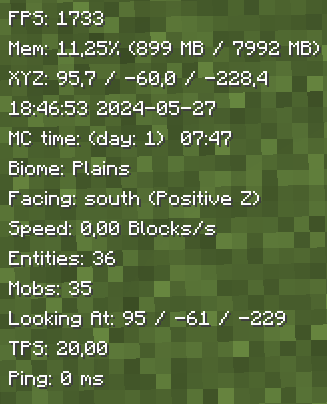
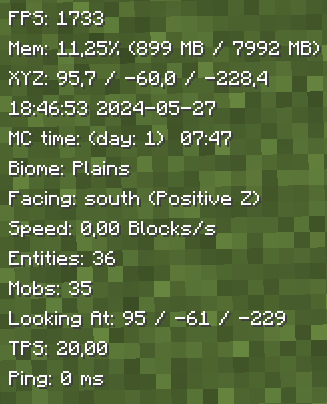
UltimateHud is a mod that displays essential information for each user in the HUD. Everything is configurable from the ultimatehud.json file inside your ./minecraft/config folder. In it, you will find a file similar to this:
Now, you can also change the options with the "Mod Menu" mod.
{
  "showFPS": true, // Displays the Frames Per Second (FPS) on the screen.
  "showRAM": true, // Displays the amount of RAM (memory) being used.
  "showCoordinates": true, // Shows the player's current coordinates in the game world.
  "showRealTime": true, // Displays the real-world current time.
  "showRealDate": true, // Displays the real-world current date.
  "showMinecraftTime": true, // Shows the in-game time.
  "showBiome": true, // Displays the current biome the player is in.
  "showFacing": true, // Shows the direction the player is facing.
  "showSpeed": true, // Displays the player's current speed.
  "showEntities": true, // Shows the number of entities around the player.
  "showMobs": true, // Displays the number of mobs around the player.
  "showLookingAt": true, // Shows information about the block or entity the player is currently looking at.
  "showTps": true, // Displays the server's Ticks Per Second (TPS).
  "showPing": true, // Shows the player's ping to the server.
  "textShadow": true, // Adds a shadow effect to the text for better readability.
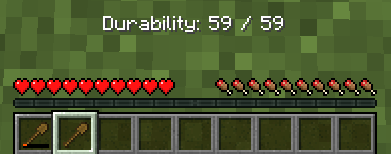
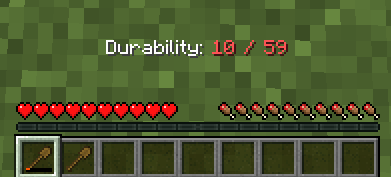
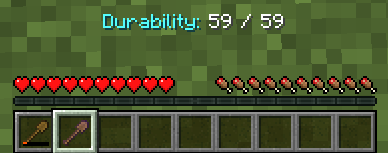
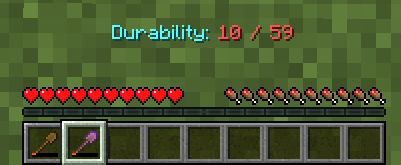
  "showItemDurability": true, // Displays the durability of the item the player is currently holding.
  "hudPosition": "LEFT" // Positions the HUD (Heads-Up Display) on the left side of the screen.
}
Fabric Loader 0.15.11 or newer is needed.
All options are toggled by setting them to true (enabled) or false (disabled), except for the last option, which sets the HUD to the left (left) or to the right (right).
TO-DO:
- Add integration with Mod Menu to modify the options from within the game. (Done)
- Update to 1.20.5/1.20.6. (Done)
- Add Mob Counter. (Done)
- Add Entity Counter. (Done)
- Add TPS. (Done)
- Add Tool Durability. (Done)
- Add underline behind the HUD information.
- Add color change functionality.
- Add the ability to change the name and format in which the information appears.
- Add the option to individually move the parameters to the right or left.
- Add MSPT
Translated into the following languages:
- English
- Spanish
- French
- Japanese
- Portuguese
- Chinese
Quick facts
- Edition: Minecraft Java
- File type: .jar
- Minecraft versions listed: 1.21, 1.21.1
- How to install: Install the matching mod loader (Forge, Fabric or NeoForge) for your Minecraft version. → Download the .jar. → Put it in the .minecraft/mods folder and launch that loader profile.
- Where to get it: Opens on Modrinth — not every file is mirrored on our own servers.
Install steps are the general flow for this file type — How to install Minecraft Java mods & modpacks walks through it step by step.
Verified by MCModsHub
- Ships as ultimate-hud-0.6.1-B-1.21.1.jar — drop this file into the mods folder
- Download size: 73 KB
- Download link checked 31 Aug 2026 — working
These come from our own check of the pack file, not from the source page.