an advanced model editing mod for Minecraft
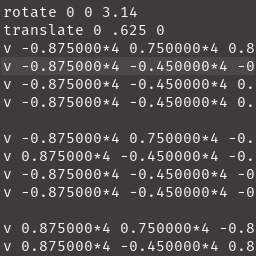
using scripts to render vertices, particles, and visually modify the player model
Scripted Models has examples on how to use it here
Example Mod:
download the ".txt" files to ".minecraft/ScriptedModels"
then select them in the GUI by pressing "R"
Developers
Fabric
dependencies {
	modImplementation "maven.modrinth:scripted-models:0.7.2"
}
repositories {
	maven {
		name = "Modrinth"
		url = "https://api.modrinth.com/maven"
		content {
			includeGroup "maven.modrinth"
		}
	}
}
Mods using Scripted Models
Quick facts
- Edition: Minecraft Java
- File type: .jar
- Minecraft version listed: 1.19.3
- How to install: Install the matching mod loader (Forge, Fabric or NeoForge) for your Minecraft version. → Download the .jar. → Put it in the .minecraft/mods folder and launch that loader profile.
- Where to get it: Opens on Modrinth — not every file is mirrored on our own servers.
Install steps are the general flow for this file type — How to install Minecraft Java mods & modpacks walks through it step by step.
Verified by MCModsHub
- Ships as scripted-models-0.7.4.jar — drop this file into the mods folder
- Download size: 68 KB
- Download link checked 31 Aug 2026 — working
These come from our own check of the pack file, not from the source page.