ModsJava
FlagsH
[download]: [downloadLink]: [discord-shield]: [discord-invite]: [ ![download][] ][downloadLink] [ ![discord-shield][] ][discord-invite] [**Discord**]( |…
⬇ Download on Hangar[download]: https://img.shields.io/github/downloads/HydrolienF/FlagsH/total
[downloadLink]: https://hangar.papermc.io/Hydrolien/FlagsH
[discord-shield]: https://img.shields.io/discord/728592434577014825?label=discord
[discord-invite]: https://discord.gg/RPNbtRSFqG
[ ![download][] ][downloadLink]
[ ![discord-shield][] ][discord-invite]
[**Discord**](https://discord.gg/RPNbtRSFqG) | [**Hangar**](https://hangar.papermc.io/Hydrolien/FlagsH) | [**Spigot**](https://www.spigotmc.org/resources/flagsh.113920/) | [**GitHub**](https://github.com/HydrolienF/FlagsH)
# FlagsH
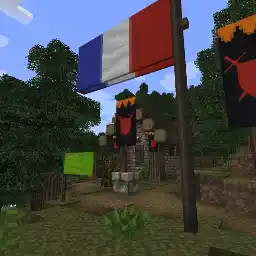
Minecraft plugins to display banners as flags.

## Use
this plugin tries to be as intuitive as possible. No command is needed to create, extend and remove a flag.
- Place a banner item on a block to get a banner.
- Place a banner item on a block while sneaking to get a flag.
- Extends flag or banner by placing new banner item onto the flag or banner.
- Break flag or banner by hitting it.
## Compatibility
FlagsH work with Spigot, Paper, Folia (and should work with any fork).
FlagsH is compatible with [Towny](https://github.com/TownyAdvanced/Towny) claim permission.
## Admin commands
- `/flagsh` or `fh` Print the version.
- `/fh reload` Reload config & flags data file.
- `/fh list` Print the list of all flags.
- `/fh remove |all` Remove a flag on the list based on its possition or all flags.
## Install
1. Download last version.
2. Place it in `plugins/` in your server files.
3. Restart your server
Supported Minecraft version are listed in each release.
If you are using an older Minecraft version than 1.20.5, you will need to have Java 21 on your server.
## Configure
After 1st launch you can edit config in `plugins/FlagH/config.yml`
`maxFlagSize` is the max size of a flag. Default size is 1. A size of 2 means that the flag is 2 times larger and 2 times longer. If a player try to increase flag size over the limit then flag won't be extended, banner item will drop to the ground and angry NPC sound will be played.
Each new banner added extend the flag of `increasingSizeStep`.
`flagEnable` & `bannerEnable` enable or disable flag or banner.
`forbidenInteractGamemodes` is a list of gamemode in witch player can't interact with flags and banners. Usualy you only want player in adventure not being able to edit flag, but you might also want to prevent any player in survival to place or destroy banner.
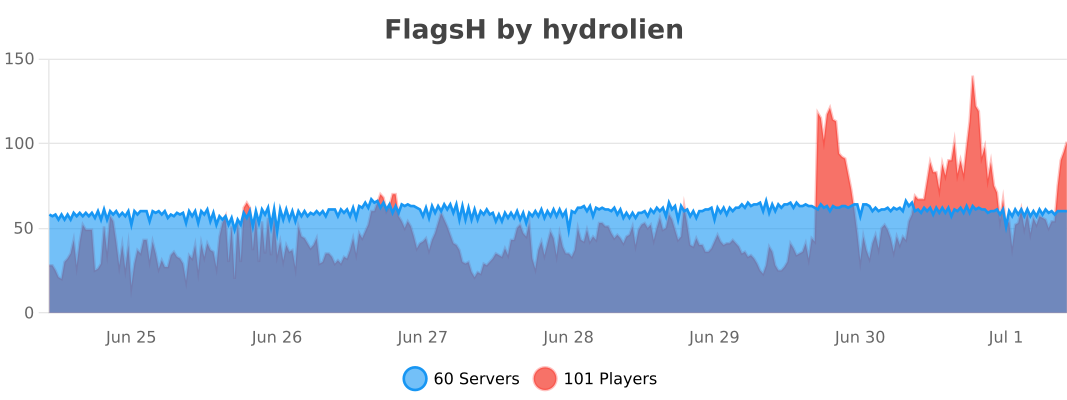
## Statistics
[](https://bstats.org/plugin/bukkit/FlagsH/19981)
## Build
Go to [GitHub](https://github.com/HydrolienF/FlagsH) and follow build instruction
Quick facts
- Edition: Minecraft Java
- File type: .jar
- Minecraft versions listed: 1.20, 1.20.1, 1.20.2
- How to install: Install the matching mod loader (Forge, Fabric or NeoForge) for your Minecraft version. → Download the .jar. → Put it in the .minecraft/mods folder and launch that loader profile.
- Where to get it: Opens on Hangar — not every file is mirrored on our own servers.
Install steps are the general flow for this file type — How to install Minecraft Java mods & modpacks walks through it step by step.
FlagsH is a free Minecraft Java mod. Compatible with Minecraft 1.20, 1.20.1, 1.20.2, 1.20.3 and newer. Downloaded 784 times (via Hangar). Download it and open it directly in the game.