


Neko Fabric Hacks provides a series of (not really) useful functionality
Made by 🐱
Neko Fabric Hacks
Functionality
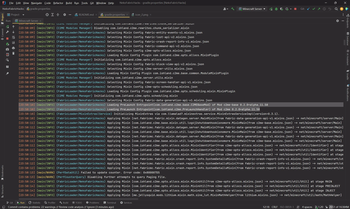
- (A little more) verbose log messages:
- Logs out mod entrypoints loading information
Loading Main Entrypoint(me.jellysquid.mods.lithium.common.LithiumMod) of Mod lithium 0.12.1 - Logs out Mixin config selecting and mixin config plugin loading information.
Selecting Mixin Config mixinextras.init.mixins.json Loading Mixin Config Plugin com.llamalad7.mixinextras.platform.fabric.MixinExtrasConfigPlugin - Logs out Mixin Apply info
Applying Mixin [net.fabricmc.fabric.mixin.registry.sync.RegistryMixin(from fabric-registry-sync-v0.mixins.json) -> net/minecraft/registry/Registry] at stage MAIN (InjectorOrder: 0)
Applying Mixin [net.fabricmc.fabric.mixin.registry.sync.RegistryMixin(from fabric-registry-sync-v0.mixins.json) -> net/minecraft/registry/Registry] at stage INJECT_PREPARE (InjectorOrder: 0)
Applying Mixin [net.fabricmc.fabric.mixin.registry.sync.RegistryMixin(from fabric-registry-sync-v0.mixins.json) -> net/minecraft/registry/Registry] at stage ACCESSOR (InjectorOrder: 0)
Applying Mixin [net.fabricmc.fabric.mixin.registry.sync.RegistryMixin(from fabric-registry-sync-v0.mixins.json) -> net/minecraft/registry/Registry] at stage INJECT_PREINJECT (InjectorOrder: 0)
- Logs out mod entrypoints loading information
Quick facts
- Edition: Minecraft Java
- File type: .jar
- Minecraft versions listed: 1.20, 1.20.1, 1.20.2
- How to install: Install the matching mod loader (Forge, Fabric or NeoForge) for your Minecraft version. → Download the .jar. → Put it in the .minecraft/mods folder and launch that loader profile.
- Where to get it: Opens on Modrinth — not every file is mirrored on our own servers.
Install steps are the general flow for this file type — How to install Minecraft Java mods & modpacks walks through it step by step.
Verified by MCModsHub
- Ships as neko-fabric-hacks-1.1.0-all.jar — drop this file into the mods folder
- Download size: 306 KB
- Download link checked 31 Aug 2026 — working
These come from our own check of the pack file, not from the source page.