Rift Realms Utility
Java mod listed for Minecraft 1.20. Downloads from the MC Java Mods app on Android.
⬇ Download on Modrinth
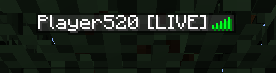
Rift Realms Utility
Riftrealmsutils is a Minecraft mod that provides various utilities for managing player tags and other features
RIFT REALMS UTILITY IS DISCONTINUED It is being split into separate mods, two of them are already released for 1.21.1
Features
Player Tags: Set, clear, and display custom tags for players.
Nick names: Set and clear nick names.
Name styles: Set and clear the formatting used for your name.
Broadcast Control: Enable or disable broadcast messages for player join/leave events.
Graves: Graves holding player's inventory and trinkets, inspired in visuals by those on Content SMP.
Boat step height modification: Set how high boats can step. Useful for making boat highways. Only applies to boats placed after the command is run
Commands
- /togglebroadcast: Toggles the broadcast of player join/leave messages. Requires operator level 2.
- /boatstepheight <height>: Sets the step height for all boats placed afterwards. Requires operator level 4.
- /playertag set <tagName>: Sets a custom tag for the player. Requires the command to be executed by a player.
- /playertag clear: Clears the custom tag for the player. Requires the command to be executed by a player.
- /formatname add <formatting>: Adds a custom formatting to the player's name. Requires the command to be executed by a player.
- /formatname clear: Removes all formattings from player's name. Requires the command to be executed by a player.
- /nick set <tagName>: Sets a custom nickname for the player. Requires the command to be executed by a player.
- /nick clear: Clears the custom nickname for the player. Requires the command to be executed by a player.
- Edition: Minecraft Java
- File type: .jar
- Minecraft version listed: 1.20.1
- How to install: Install the matching mod loader (Forge, Fabric or NeoForge) for your Minecraft version. → Download the .jar. → Put it in the .minecraft/mods folder and launch that loader profile.
- Where to get it: Opens on Modrinth — not every file is mirrored on our own servers.
Install steps are the general flow for this file type — How to install Minecraft Java mods & modpacks walks through it step by step.
- Ships as riftrealmsutils-1.3.jar — drop this file into the mods folder
- Download size: 111 KB
- Download link checked 11 Oct 2026 — working
These come from our own check of the pack file, not from the source page.