Alternate Create Of Fiery Items
About the mod
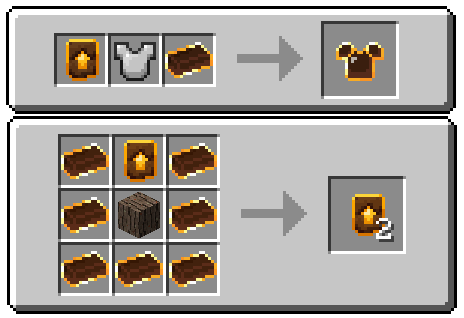
Alternate Create Of Fiery Items (ACOFI) is an addon for Twilight Forest that changes the crafting of fiery equipment to be similar to Netherite after the 1.20 update.
Fiery Upgrade Template
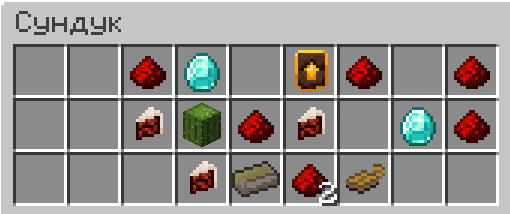
The template is used to upgrade iron items to fiery items. It spawns in chests within the Ur-Ghast's Dark Tower.
Configuration
(For mod version 1.2.0 and above)
Configuration file - /config/acofi-common.toml
In the config, you can adjust the template spawn chance and which loot tables it will generate in. That is, you can make the template drop from a mob, boss, or any other structure besides the Dark Tower.
Example config:
["ACOFI Config"]
  #Upgrade template spawn chance. (0.2 = 20%)
  #Default: 0.2
  #Range: 0.0 ~ 1.0
  upgrade_template_spawn_chance = 0.65
  #List of loot table IDs where the upgrade template will spawn.
  #Default: ["twilightforest:chests/darktower_cache", "twilightforest:chests/darktower_key"]
  target_tables = ["minecraft:chests/end_city_treasure", "minecraft:entities/warden"]
О моде
Alternate Create Of Fiery Items (ACOFI) - это аддон для Twilight forest меняющий способ создания огненного снаряжения, на подобный незеритовому после обновления 1.20.
Шаблон огненного улучшения
Шаблон используется для улучшения железных вещей в огненные. Спавнится в сундуках тёмной башни Ур-Гаста.
Конфигурация
(Для версии мода начиная с 1.2.0 и выше)
Файл конфигурации - /config/acofi-common.toml
В конфиге можно настроить шанс спавна шаблона и в каких таблицах лута он будет генерироваться. То есть, можно сделать чтобы шаблон дропался с какого-то моба, босса или в любой другой структуре помимо тёмной башни.
Пример конфига:
["ACOFI Config"]
  #Upgrade template spawn chance. (0.2 = 20%)
  #Default: 0.2
  #Range: 0.0 ~ 1.0
  upgrade_template_spawn_chance = 0.65
  #List of loot table IDs where the upgrade template will spawn.
  #Default: ["twilightforest:chests/darktower_cache", "twilightforest:chests/darktower_key"]
  target_tables = ["minecraft:chests/end_city_treasure", "minecraft:entities/warden"]
- Edition: Minecraft Java
- File type: .jar
- Minecraft version listed: 1.21.1
- How to install: Install the matching mod loader (Forge, Fabric or NeoForge) for your Minecraft version. → Download the .jar. → Put it in the .minecraft/mods folder and launch that loader profile.
- Where to get it: Opens on Modrinth — not every file is mirrored on our own servers.
Install steps are the general flow for this file type — How to install Minecraft Java mods & modpacks walks through it step by step.
- Ships as acofi-1.2.0-neoforge-1.21.1.jar — drop this file into the mods folder
- Download size: 17 KB
- Download link checked 31 Aug 2026 — working
These come from our own check of the pack file, not from the source page.