
Cobblemon Type Table
Java mod listed for Minecraft 1.21. Downloads from the MC Java Mods app on Android.
⬇ Download on Modrinth




You can follow development, devlogs, and future updates for free here 📝
And if you'd like to support the project you can grab me a Ko-fi ☕

Type Effectiveness Chart
This is a simple mod that adds the Pokémon type effectiveness chart into Minecraft.
It works alongside Cobblemon and Pixelmon, or any other mod!
The type chart can be opened by right-clicking the item in hand.
It can also be opened with the default key H (configurable in Controls - Keybinds).
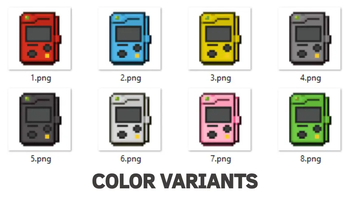
8 different colors for the type table.
Icons can be displayed with or without borders, toggleable in-game under mod options or directly in the config file (cobblemontypechart-common.toml).
To change it directly in-game, you need Mod Menu.
Type Table
In-game type chart.

Tooltips
Hover over a type icon to view its effectiveness.

Recipe
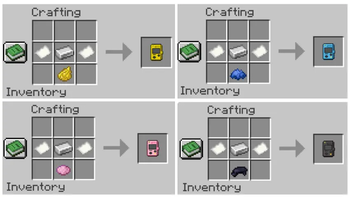
Crafting recipe (2 paper + 1 iron ingot) + dye for different color.

This mod is entirely client-side and works on any vanilla or modded server.
Note: The type chart may appear blurry if you’re not using shaders with Iris, OptiFine, or similar mods. To fix this issue without shaders, go to Video Settings - Menu Background Blur and set it to OFF.
Mod Collection ⚔️


- Edition: Minecraft Java
- File type: .jar
- Minecraft version listed: 1.21.1
- How to install: Install the matching mod loader (Forge, Fabric or NeoForge) for your Minecraft version. → Download the .jar. → Put it in the .minecraft/mods folder and launch that loader profile.
- Where to get it: Opens on Modrinth — not every file is mirrored on our own servers.
Install steps are the general flow for this file type — How to install Minecraft Java mods & modpacks walks through it step by step.
- Ships as cobblemontypechart-1.0.4.jar — drop this file into the mods folder
- Download size: 6.2 MB
- Download link checked 11 Oct 2026 — working
These come from our own check of the pack file, not from the source page.