
Show Me
I don't know my version or loader


🌐 Supported Languages
Show Me is now available in multiple languages to enhance the player experience:
- 🇺🇸 English (EN-US)
- 🇧🇷 Portuguese (Brazil - PT-BR)
- 🇪🇸 Spanish (Spain - ES-ES) ✅ New!
All HUD texts, menus, and settings are fully translated.
Language is selected automatically based on the Minecraft client language.
🇺🇸 EN-US
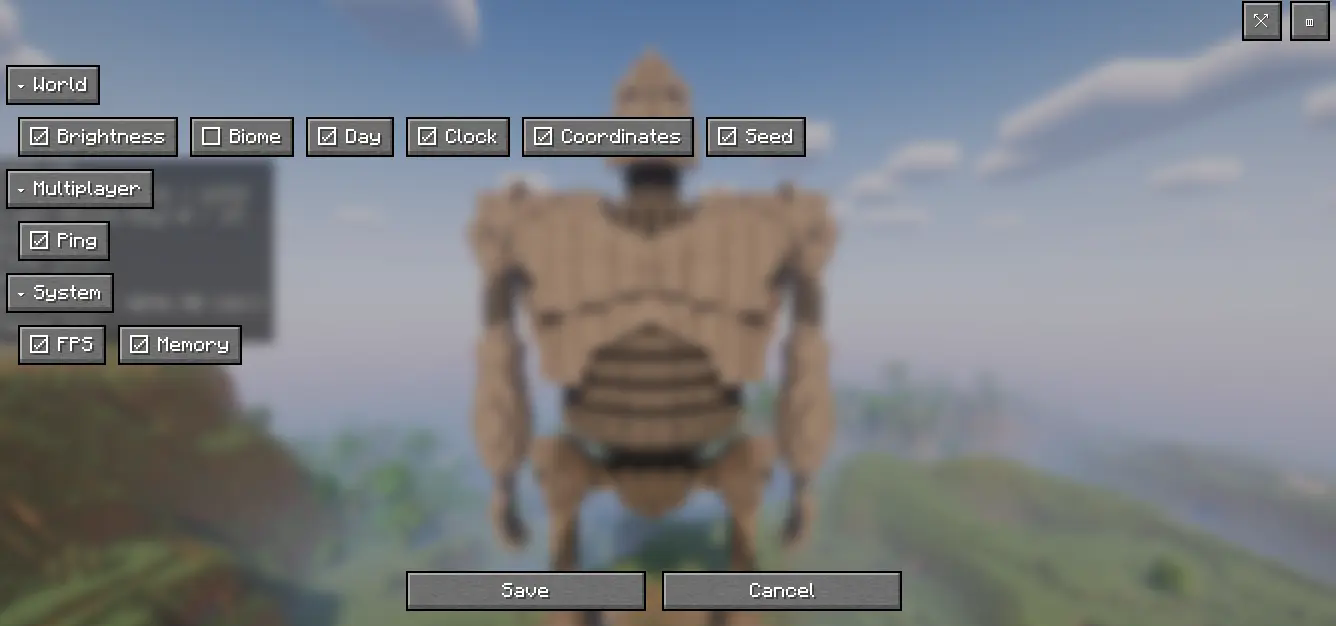
Show Me is a lightweight, fully customizable HUD for players who find the F3 screen too noisy. Instead of a massive debug panel, you choose exactly what to display and where.
✨ Features
- Modular Display: Show only what you want – FPS, Coordinates, Brightness, Biome, World Day, Time of Day, Ping, World Seed, RAM usage, and more.
- Two View Modes: Normal or Compact.
- Live Settings: Adjust everything in-game, no restart required.
- Customizable HUD: Drag and drop to position HUD elements anywhere on the screen.
- Clean Visuals: Readable fonts and minimalistic style.
- Hotkeys: Quickly hide/show or open settings.
🧭 Quick Start
- Open the Show Me settings in-game.
- Select your preferred modules (e.g., FPS + Coordinates).
- Choose Normal or Compact mode and position the HUD where you like.
- Play!
⌨️ Default Hotkeys
- Hide/Show HUD: X
- Open Settings: Z
🇪🇸 ES-ES
Show Me es un HUD ligero y totalmente personalizable para jugadores que consideran que la pantalla F3 es demasiado cargada. En lugar de un panel de depuración enorme, tú decides exactamente qué mostrar y dónde.
✨ Características
- Visualización Modular: Muestra solo lo que quieras – FPS, Coordenadas, Nivel de luz, Bioma, Día del mundo, Hora del día, Ping, Seed del mundo, Uso de RAM y más.
- Dos Modos de Vista: Normal o Compacto.
- Configuración en Vivo: Ajusta todo dentro del juego, sin necesidad de reiniciar.
- HUD Personalizable: Arrastra y coloca los elementos del HUD en cualquier parte de la pantalla.
- Estética Limpia: Tipografías legibles y estilo minimalista.
- Teclas Rápidas: Oculta/muestra el HUD o abre la configuración al instante.
🧭 Inicio Rápido
- Abre la configuración de Show Me dentro del juego.
- Selecciona los módulos que prefieras (por ejemplo: FPS + Coordenadas).
- Elige el modo Normal o Compacto y coloca el HUD donde más te guste.
- ¡A jugar!
⌨️ Teclas Rápidas por Defecto
- Ocultar/Mostrar HUD: X
- Abrir Configuración: Z
🇧🇷 PT-BR
Show Me é um HUD leve e totalmente personalizável para jogadores que acham a tela F3 muito poluída. Em vez de um painel de depuração gigante, você escolhe exatamente o que exibir e onde.
✨ Características
- Exibição Modular: Mostre apenas o que quiser – FPS, Coordenadas, Brilho, Bioma, Dia do Mundo, Horário do Dia, Ping, Seed do Mundo, Uso de RAM e muito mais.
- Dois Modos de Visualização: Normal ou Compacto.
- Configuração ao Vivo: Ajuste tudo dentro do jogo, sem precisar reiniciar.
- HUD Personalizável: Arraste e posicione os elementos do HUD em qualquer lugar da tela.
- Visual Limpo: Fontes legíveis e estilo minimalista.
- Teclas de Atalho: Oculte/mostre rapidamente ou abra as configurações.
🧭 Início Rápido
- Abra as configurações do Show Me no jogo.
- Selecione os módulos desejados (ex.: FPS + Coordenadas).
- Escolha o modo Normal ou Compacto e posicione o HUD onde preferir.
- Jogue!
⌨️ Teclas de Atalho Padrão
- Ocultar/Exibir HUD: X
- Abrir Configurações: Z
- Edition: Minecraft Java
- File type: .jar
- Minecraft versions listed: 1.21.9, 1.21.10
- How to install: Install the matching mod loader (Forge, Fabric or NeoForge) for your Minecraft version. → Download the .jar. → Put it in the .minecraft/mods folder and launch that loader profile.
- Where to get it: Opens on Modrinth — not every file is mirrored on our own servers.
Install steps are the general flow for this file type — How to install Minecraft Java mods & modpacks walks through it step by step.
- Ships as show-me-1.3.0.jar — drop this file into the mods folder
- Download size: 1.1 MB
- Download link checked 31 Aug 2026 — working
These come from our own check of the pack file, not from the source page.