
ModsJava
Different Emerald Trades
I don't know my version or loader
Open the Minecraft launcher and look at the profile you play on — it names both, like fabric-loader-1.21.4. The version also shows in the bottom-right corner of the game's main menu.
No loader in the profile name? Then it's plain Minecraft, and these mods won't run — you need Fabric or NeoForge installed first.
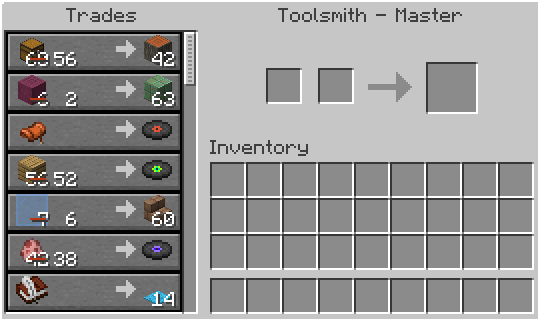
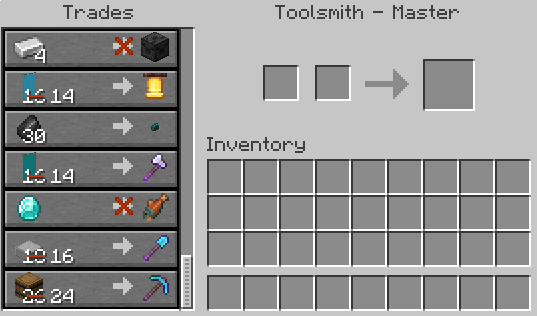
A Simple Mod to allow users to change out the emeralds in villager trades.
Configuration:
Disable.All.Trades=false #boolean | default: false Randomize.Emeralds=false #boolean | default: false Randomize.Everything=false #boolean | default: false Get.Value.From.Item.IDs=false #boolean | default: falseand
First.Buy.Item.Provider=minecraft:emerald #string | default: minecraft:emerald Second.Buy.Item.Provider=minecraft:emerald #string | default: minecraft:emerald Sell.Item.Provider=minecraft:emerald #string | default: minecraft:emeraldEach slot can be a different config. If you want all options to be the same, then you MUST have the same option on each line.
For the Item ID section simply replace the minecraft:air with the item id of the item you want, as though you were using the /give command. for example:
minecraft:iron_ingot or if modded, for example: emerald_tools:rubyQuick facts
- Edition: Minecraft Java
- File type: .jar
- Minecraft versions listed: 1.20, 1.20.1
- How to install: Install the matching mod loader (Forge, Fabric or NeoForge) for your Minecraft version. → Download the .jar. → Put it in the .minecraft/mods folder and launch that loader profile.
- Where to get it: Opens on Modrinth — not every file is mirrored on our own servers.
Install steps are the general flow for this file type — How to install Minecraft Java mods & modpacks walks through it step by step.
Verified by MCModsHub
- Ships as custom-villager-trade-materials-mod-1.0.0-1.20.1.jar — drop this file into the mods folder
- Download size: 71 KB
- Download link checked 31 Aug 2026 — working
These come from our own check of the pack file, not from the source page.