
Qui quaerit, reperit
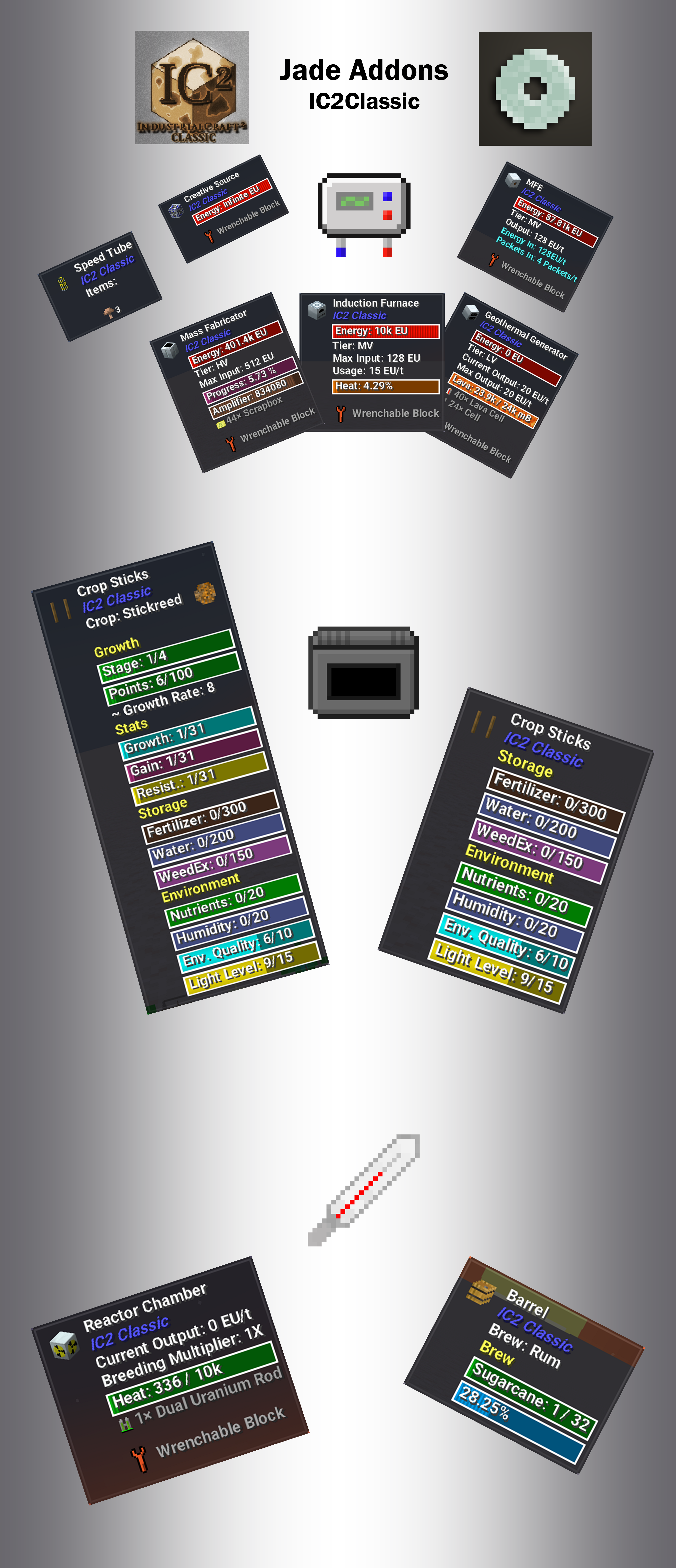
This addon is meant to provide additional info about IC2Classic machines/blocks when Jade mod is loaded.
How it works:
Industrial Craft was always trying to motivate players to use most of its tools to get maximum from the mod. IC2Classic is no exception. There is one VERY IMPORTANT thing to keep in mind. For additional information to be shown, you have to have several tools present on your hotbar.
Tools on hotbar or inside armor helmet:
- EU-Reader: will show additional EU related information (MaxInput, EnergyUsage, EnergyStorage, etc.);
- Crop Analyzer: will show additional information about crops;
- Thermometer: will show additional information about brewing and various heat-related info from reactors, boilers, etc.
Join Speiger's Hideout to get in touch with IC2Classic community and seek for help/advice:
Quick facts
- Edition: Minecraft Java
- File type: .jar
- Minecraft version listed: 1.19.2
- How to install: Install the matching mod loader (Forge, Fabric or NeoForge) for your Minecraft version. → Download the .jar. → Put it in the .minecraft/mods folder and launch that loader profile.
- Where to get it: Opens on Modrinth — not every file is mirrored on our own servers.
Install steps are the general flow for this file type — How to install Minecraft Java mods & modpacks walks through it step by step.
Verified by MCModsHub
- Ships as IC2CJadeAddon-1.19.2-2.0.5.jar — drop this file into the mods folder
- Download size: 186 KB
- Download link checked 31 Aug 2026 — working
These come from our own check of the pack file, not from the source page.