

WynnMarketSearch
A fast, searchable GUI for the Wynncraft marketplace — favorites, pinned slots, and search history baked in.
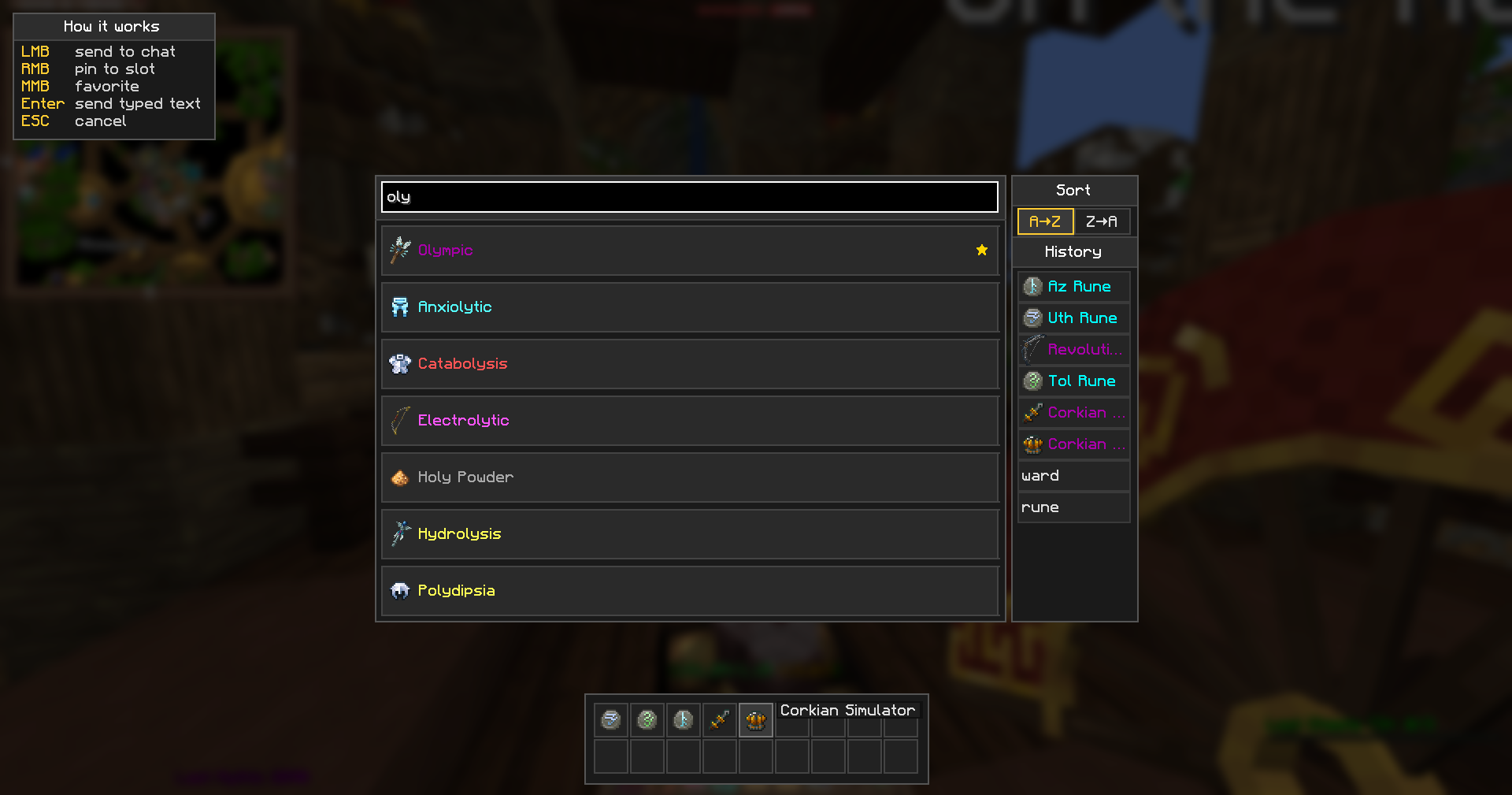
When the market asks Type the item name or type 'cancel' to cancel:, this mod replaces the awkward chat-typing with a real search panel. Find an item, click, done.
✨ Features
- 🔍 Live fuzzy search — start typing, results appear instantly with the proper Wynncraft icons and rarity colors.
- ⭐ Favorites — middle-click to star an item. Starred items always float to the top of the list.
- 📌 Pinned slots — right-click to pin an item to a hotbar-style strip at the bottom of the screen. Up to 18 slots, two rows. One click on a slot sends the item to chat.
- 🕘 Search history — last 20 sent queries with their icons in the side panel. Click to re-send, never re-type the same name twice.
- ↕️ Sort — A→Z or Z→A, your choice; favorites still go first.
- 💡 Built-in help — toggleable hints box in the corner explains every click.
- 🌐 No API key required — items load from a daily-refreshed backend. The Wynncraft API key is server-side, you never see it.
- 🌍 Localized — English and Russian config translations included.
🎮 Controls
| Action | Effect |
|---|---|
| LMB on item | send name to chat |
| RMB on item | pin to bottom slot |
| MMB on item | toggle favorite (★ marker) |
| LMB on slot / history row | re-send to chat |
| RMB on slot / history row | remove |
| Enter | send the typed text as-is |
| ESC | cancel |
⚙️ Commands
| Command | What |
|---|---|
/wms |
open the GUI manually |
/wms add <name> |
add a personal custom item (local) |
/wms del <name> |
remove a personal custom item |
/wms list |
list personal customs |
/wms reload |
force a fresh fetch from the backend |
📦 Requirements
- Minecraft 1.21.11 (Fabric)
- Fabric API
- Cloth Config
- Mod Menu (optional, for the settings screen)
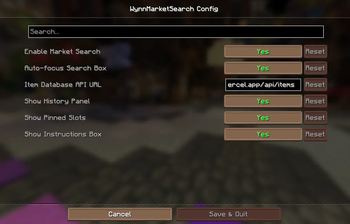
⚙️ Settings (Mod Menu → WynnMarketSearch)
| Option | Description |
|---|---|
| Enable Market Search | open the GUI on the market chat trigger |
| Auto-focus Search Box | focus the input on open |
| Item Database API URL | override the backend (self-host friendly) |
| Show History Panel | show / hide the history list |
| Show Pinned Slots | show / hide the bottom strip |
| Show Instructions Box | show / hide the corner hints |
💾 Where data is stored
All state lives in <runDir>/wms/:
items_cache.json— daily snapshot of the item databasefavorites.json— your starred itemspinned_slots.json— your pinned hotbarhistory.json— your last 20 queriescustom_items.json— your personal custom items (/wms add)
Nothing is sent anywhere except the daily request to fetch the item database.
❓ FAQ
Does it work with vanilla Wynncraft? Yes — it's a client-side mod, no server install needed.
Will the icons of all items render correctly? Yes, including ingredient/material heads with custom Wynncraft skin textures.
Can I self-host the item database?
Yes — set Item Database API URL in the config to your own deployment. The backend is open-source: wms-site.
Why 14 results max? Just a soft cap to keep the GUI clean. Refining your search gets you what you need fast.
🐛 Bug reports & source
- Issues: https://github.com/a0gzy/WynnMarketSearch/issues
- Source: https://github.com/a0gzy/WynnMarketSearch
- Backend & landing: https://wms-site-api.vercel.app
Not affiliated with Wynncraft or Mojang.
- Edition: Minecraft Java
- File type: .jar
- Minecraft version listed: 1.21.11
- How to install: Install the matching mod loader (Forge, Fabric or NeoForge) for your Minecraft version. → Download the .jar. → Put it in the .minecraft/mods folder and launch that loader profile.
- Where to get it: Opens on Modrinth — not every file is mirrored on our own servers.
Install steps are the general flow for this file type — How to install Minecraft Java mods & modpacks walks through it step by step.
- Ships as wms-2.1.0+mc1.21.11.jar — drop this file into the mods folder
- Download size: 113 KB
- Download link checked 31 Aug 2026 — working
These come from our own check of the pack file, not from the source page.