HomeJavaModsBlockBoy Arcade
BlockBoy Arcade
ModsJava

BlockBoy Arcade

by tomalbrc · on Modrinth

Serverside GameBoy emulator as Arcade machines with data driven cartridge items!. Free Minecraft Java mod for 26.1, 26.1.1, 26.1.2.

Which Minecraft do you have?

Every version of the game needs its own build. Pick yours, then download — the wrong build installs fine and then does nothing in the game. This mod is built for Fabric only.

⬇ Download for 26.1–26.1.2⬇ Download for 1.21.11⬇ Download for 1.21.6–1.21.8⬇ Download for 1.21.5
I don't know my version or loader
Open the Minecraft launcher and look at the profile you play on — it names both, like fabric-loader-1.21.4. The version also shows in the bottom-right corner of the game's main menu.
No loader in the profile name? Then it's plain Minecraft, and these mods won't run — you need Fabric or NeoForge installed first.
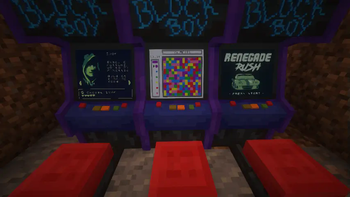
BlockBoy Arcade — screenshot 1

This mod will no longer be updated on modrinth!

See https://www.curseforge.com/minecraft/mc-mods/blockboy-arcade for the latest version!

Arcade machines with full gameboy resolution and color support!

Fully server-side, using polymer! Checkout polymers authost feature to host the resource-pack (in polymer/resourcepack.zip) automagically!

There are no recipes, use /polymer creative to see the items or use /give @s blockboy:arcade

The mods' builtin datapack comes with 6 open source gameboy games:

Config

{
  "dateFormat": "dd.MM yyyy, HH:mm",
  "sound": false
}

Adding roms / items

You can either add cartridge items using filament or just use the blockboy:rom component to give yourself an item that can play a given rom file: /give @s paper[blockboy:rom="namespace:game.gb"]

Put the roms in data/<namespace>/blockboy/<rom>.gb and data/<namespace>/blockboy/<rom>.gbc Make sure the rom file names are lowercase and only contain letters from a to z, 0-9 and/or underscores.

To add your own arcade model item + block use the filament mod and the blockboy:arcade behaviour for decorations.

Arcade example for filament (data//filament/decoration/.json):

{
  "id": "blockboy:arcade",
  "group": "blockboy:items",
  "blockTags": ["shulker_boxes"],
  "itemResource": {
    "models": {
      "default": "blockboy:item/arcade-item",
      "floor": "blockboy:item/arcade"
    }
  },
  "properties": {
    "rotate": true,
    "rotateSmooth": true,
    "stackSize": 1,
    "destroyTime": 2,
    "requiresTool": false
  },
  "behaviour": {
    "blockboy:arcade": {
      "seatTranslation": [0, 0.4, 0],
      "screenTranslation": [0, 0.95, -0.775],
      "screenPitch": -22.5,
      "brightness": 10
    }
  },
  "blocks": [
    {
      "origin": [0,0,-1],
      "size": [1,1,2]
    },
    {
      "origin": [0,1,-1],
      "size": [1,1,1]
    }
  ]
}

Cartridge / rom item example for filament (data//filament/item/.json):

{
  "id": "blockboy:flooder",
  "translations": {
    "en_us": "Flooder"
  },
  "group": "blockboy:items",
  "vanillaItem": "minecraft:paper",
  "itemResource":{
    "models": {
      "default": "blockboy:item/cartridge2"
    }
  },
  "properties": {
    "stackSize": 1
  },
  "components": {
    "blockboy:rom": "namespace:flooder.gb"
  }
}

Blockboy Arcade comes with 2 item textures/models for cartridges, feel free to modify them as you wish: blockboy:item/cartridge1 and blockboy:item/cartridge2

Permissions for Luckperms and friends: blockboy_arcade.command, with vanilla permission level 1

Controls:


This project uses code from the coffee-gb gameboy emulator and the Image2Map Mod You can find the original licenses in the "licenses" directory. My changes are also licensed under the MIT license.

Verified by MCModsHub

These come from our own check of the pack file, not from the source page.

Explore more