
Searchable Packs
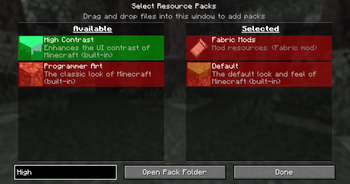
Find your favorite resource packs faster than ever with this sleek search bar added directly to the resource pack screen.
Features
- Integrated search bar in the resource pack menu
- Instant live filtering of resource packs by name
- Clear visual feedback: green highlight for matching packs, red for non-matching
- Lightweight, seamless, and easy to use
Installation
Simply place the mod into your mods folder and launch the client.
Why Use Searchable Packs?
If you have dozens of resource packs installed, scrolling can be tedious. This mod helps you quickly narrow down your options with a simple, intuitive search box — saving time and hassle.
Support & Contact
For questions or feedback, find me on Modrinth, GitHub, or Discord: jakomi123.
Quick facts
- Edition: Minecraft Java
- File type: .jar
- Minecraft versions listed: 1.21.4, 1.21.5, 1.21.6
- How to install: Install the matching mod loader (Forge, Fabric or NeoForge) for your Minecraft version. → Download the .jar. → Put it in the .minecraft/mods folder and launch that loader profile.
- Where to get it: Opens on Modrinth — not every file is mirrored on our own servers.
Install steps are the general flow for this file type — see the MC Java Mods guides for the full walkthrough.
Verified by MCModsHub
- Ships as searchablepacks-1.0.1.jar — drop this file into the mods folder
- Download size: 16 KB
- Download link checked 31 Aug 2026 — working
These come from our own check of the pack file, not from the source page.