
ModsJava
Apple Armor
I don't know my version or loader
Open the Minecraft launcher and look at the profile you play on — it names both, like fabric-loader-1.21.4. The version also shows in the bottom-right corner of the game's main menu.
No loader in the profile name? Then it's plain Minecraft, and these mods won't run — you need Fabric or NeoForge installed first.
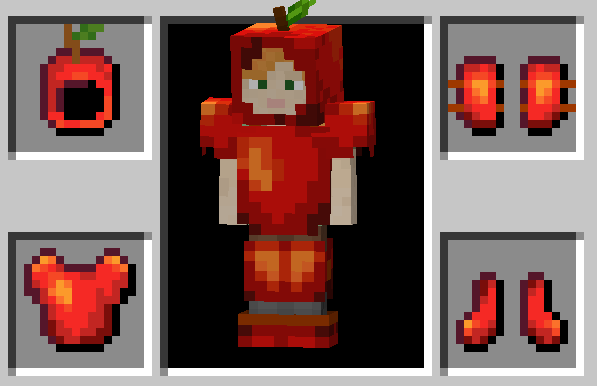
Vanilla+ mod for people who drink applesauce all by themselve
Features
Apple Armor
- Replenishes hunger upon being damaged.
- Wearing multiple pieces has slight diminishing returns. Meaning wearing 3 pieces (e.g. Helmet, Leggins & Chestplate) does not equal 3x the effect of wearing only 1 piece (e.g. only the helmet). This would be closer to 2.5x effectiveness.
- Wearing the full set of Apple Armor additionally increases the effect.
- Protection Enchantments increase the effect.
- When a armor piece breaks an apple gets dropped (2 for chestplate).
Golden Apple Armor
- Includes every Apple Armor feature.
- Bestows same status effects as golden apples upon being damaged.
- Try enchanting the armor! (doesnt matter which enchantment)
General
- Every variable is fully customizable. (Configuration can be accessed through the options screen and clicking the button with a round symbol in the top left or through using ModMenu.)
Installation
- Install Fabric
- Navigate to your .minecraft folder (in the MC launcher select the "installation" header and click the file icon next to your fabric installation)
- Download matching version of the mod and place the .jar file in .minecraft/mods
- Play :)
Supported Languages
- English
- German
Quick facts
- Edition: Minecraft Java
- File type: .jar
- Minecraft versions listed: 1.19.2, 1.19.3, 1.19.4
- How to install: Install the matching mod loader (Forge, Fabric or NeoForge) for your Minecraft version. → Download the .jar. → Put it in the .minecraft/mods folder and launch that loader profile.
- Where to get it: Opens on Modrinth — not every file is mirrored on our own servers.
Install steps are the general flow for this file type — How to install Minecraft Java mods & modpacks walks through it step by step.
Verified by MCModsHub
- Ships as apple-armor-2.0.1+1.19.3.jar — drop this file into the mods folder
- Download size: 102 KB
- Download link checked 31 Aug 2026 — working
These come from our own check of the pack file, not from the source page.