Area Assistor
A mod that ports my Java Application, MineCalc, into Minecraft as a client-side mod! This is also my first attempt at a Minecraft Mod, and as such, I would not be surprised if there are bugs.
Requirements
Minecraft >=1.21.2
Fabric Loader >=0.16.7
Fabric API >=0.106.1
owo-lib 0.12.16
How to use
To start, open the Area Assistor GUI using the key 0 (Default Bind)
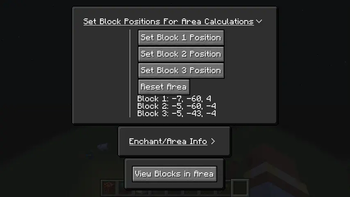
The tabs at the top relate to different services of the mod. Currently, there are three services: Set Values, Area Value/Calculation, and Block Viewing
Set Values
Select blocks by looking at them, and once all three blocks are selected, the area of the region will be calculated!
Area Value/Calculation
This will show the value of the area selected using the Set Values service! On top of this, you can view if you're inside the area you've selected. Also, you can select the level of unbreaking your tool currently has (if you're holding a tool) and get an estimation on how many pickaxes you would need to clear the area out!
Block Viewing
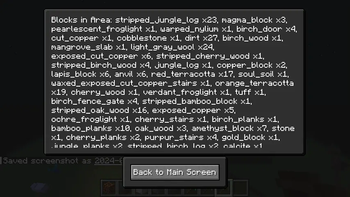
This screen lists all the blocks in the area, and the amount of each block inside the area you've selected!
Contributing
Feel free to contribute to this project as it's available under the MIT license. Find any issues or have a suggestion, report it on Github!
- Edition: Minecraft Java
- File type: .jar
- Minecraft version listed: 1.21.5
- How to install: Install the matching mod loader (Forge, Fabric or NeoForge) for your Minecraft version. → Download the .jar. → Put it in the .minecraft/mods folder and launch that loader profile.
- Where to get it: Opens on Modrinth — not every file is mirrored on our own servers.
Install steps are the general flow for this file type — How to install Minecraft Java mods & modpacks walks through it step by step.
- Ships as Area-Assistor-2.2.0.jar — drop this file into the mods folder
- Download size: 36 KB
- Download link checked 31 Aug 2026 — working
These come from our own check of the pack file, not from the source page.