
VTeamPlus
Java mod listed for Minecraft 26.x. Downloads from the MC Java Mods app on Android.
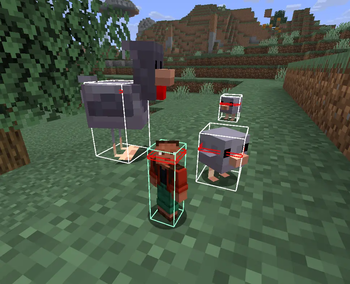
A client-side team management mod. Features custom colored hitboxes for players and loot, anti-friendly fire, and a ghost mode for better PVP.
I don't know my version or loader

&cacheSeconds=600)
VTeamPlus is a client-side utility mod designed for team management and improved visibility in multiplayer environments.
Features
- Smart Hitboxes: Applies custom colors to entity hitboxes. By default, friends are highlighted in green, enemies in red, and specified loot items in yellow. All colors can be customized via HEX codes.
- Look Vector: Visualizes where entities are looking. Features customizable styles (arrow/line/hidden), length, and colors (custom or matching the smart hitbox color). Useful for tracking movement or aiming.
- Anti-Friendly Fire: Automatically blocks weapon attacks against players on your friend list. Empty-hand punches remain enabled to allow pushing teammates.
- Ghost Mode: Players on your friend list will remain visible to you even if they have the Invisibility effect applied.
- Management GUI: All lists (friends, enemies, loot) and settings can be managed directly through an in-game menu accessible from the pause screen.
Important Notice
- Server Rules: Because this mod provides direct gameplay and PVP advantages (hitbox highlighting, visibility bypass, attack blocking), it is highly likely to be strictly prohibited on many public or competitive servers. Always check server rules before using it. You are responsible for any bans.
- Compatibility & Stability: The mod is actively in development and may be unstable. You might encounter bugs, unexpected behavior, or incompatibilities with certain other client-side mods.
Bug Reports & Feedback
If you find a bug or have a suggestion, please contact me directly on Telegram: t.me/infikot
Support the Project
If you enjoy VTeamPlus and want to support my projects, you can do so on Boosty. Any support is greatly appreciated! boosty.to/infikot
- Edition: Minecraft Java
- File type: .jar
- Minecraft versions listed: 26.1, 26.1.1
- How to install: Install the matching mod loader (Forge, Fabric or NeoForge) for your Minecraft version. → Download the .jar. → Put it in the .minecraft/mods folder and launch that loader profile.
- Where to get it: Opens on Modrinth — not every file is mirrored on our own servers.
Install steps are the general flow for this file type — How to install Minecraft Java mods & modpacks walks through it step by step.
- Ships as vteamplus-0.0.5.jar — drop this file into the mods folder
- Download size: 190 KB
- Download link checked 11 Oct 2026 — working
These come from our own check of the pack file, not from the source page.