ModsJava
Day/Night Progress Bar
I don't know my version or loader
Open the Minecraft launcher and look at the profile you play on — it names both, like fabric-loader-1.21.4. The version also shows in the bottom-right corner of the game's main menu.
No loader in the profile name? Then it's plain Minecraft, and these mods won't run — you need Fabric or NeoForge installed first.


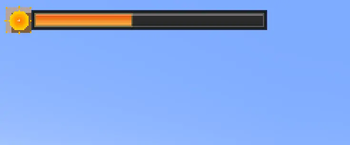
A sleek client-side HUD mod that displays the current day/night cycle progress with beautiful sun and moon indicators.
✨ Features
🎯 Core Functionality
- Real-time progress bar showing day/night cycle advancement
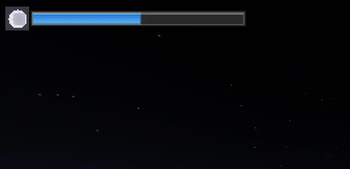
- Dynamic sun/moon icons that change based on time of day
- Weather integration - different colors during rain and thunderstorms
- Clean, modern design with gradient effects and shadows
⚙️ Customization Options
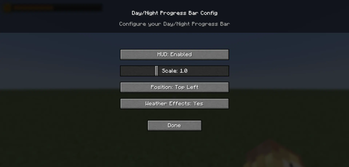
- 4 position presets: Top-left, Top-right, Bottom-left, Bottom-right
- Size scaling: Adjust from 50% to 200% to fit your screen
- Toggle on/off: Easily disable when not needed
- Weather effects: Optional color changes during storms
- Persistent settings: All preferences saved between sessions
🎮 Easy Configuration
- Press F8 to open the config menu
- Intuitive GUI with sliders and buttons
- Real-time preview of changes
- No restart required
🖼️ Visual Design
The progress bar features:
- Detailed sun icon with animated rays and golden gradients
- Realistic moon icon with craters and soft glow effects
- Multi-layered shadows and borders for depth
- Smooth color transitions between day/night themes
- Weather-responsive colors (blue for rain, purple for storms)
🔧 Technical Details
- Client-side only - works on any server
- Lightweight - minimal performance impact
- No dependencies beyond Fabric API
- Clean code - well-optimized rendering
📋 Requirements
- Minecraft: 1.21+
- Java: 21+
- Fabric Loader: 0.17.2+
- Fabric API: Any version
🚀 Installation
- Install Fabric Loader
- Download Fabric API
- Drop this mod into your
modsfolder - Launch the game and press F8 to configure!
Perfect for players who want to keep track of time without opening menus or checking the sky! 🌙✨
Quick facts
- Edition: Minecraft Java
- File type: .jar
- Minecraft versions listed: 1.21.9, 1.21.10
- How to install: Install the matching mod loader (Forge, Fabric or NeoForge) for your Minecraft version. → Download the .jar. → Put it in the .minecraft/mods folder and launch that loader profile.
- Where to get it: Opens on Modrinth — not every file is mirrored on our own servers.
Install steps are the general flow for this file type — How to install Minecraft Java mods & modpacks walks through it step by step.
Verified by MCModsHub
- Ships as daynightprogressbar 1.21.9+.jar — drop this file into the mods folder
- Download size: 23 KB
- Download link checked 31 Aug 2026 — working
These come from our own check of the pack file, not from the source page.