HomeJavaModsCloseOnMove
CloseOnMove
ModsJava

CloseOnMove

by heldheld · on Modrinth

Which Minecraft do you have?

Every version of the game needs its own build. Pick yours, then download — the wrong build installs fine and then does nothing in the game. This mod is built for Fabric only.

⬇ Download for 1.21.9–1.21.11⬇ Download for 1.21.6–1.21.8⬇ Download for 1.20.3–1.21.5⬇ Download for 1.17–1.20.2
I don't know my version or loader
Open the Minecraft launcher and look at the profile you play on — it names both, like fabric-loader-1.21.4. The version also shows in the bottom-right corner of the game's main menu.
No loader in the profile name? Then it's plain Minecraft, and these mods won't run — you need Fabric or NeoForge installed first.

CloseOnMove

Fabric Mod Enviroment Java 21 GitHub Modrinth

Close / Exit in-game GUI's using movement keys, so you can make a quick getaway!

What does it do?

Are you like me? — Accidentally opening your inventory mid-battle, or panicking and forgetting how to close a chest when you hear the hissing of a Creeper? Then this mod is great for you!

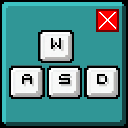
Use W, A, S, D or Space to quickly close in-game GUI's such as the inventory, creative menu, chests, advancements screen etc. It's made so that if a text field is focused, the GUI is not closed so you can still type stuff in the recipe book or creative menu for example.

Do you use other keys to move, or just want to add more keys to exit GUI's? Use the closeonmove.json file in your config folder, or use Mod Menu in the mod versions of Minecraft 1.20.3 and above.

image

Dependencies

Compatibility

I have not found any incompatibilities in terms of other mods, although Java 21 is required.

Quick facts

Install steps are the general flow for this file type — How to install Minecraft Java mods & modpacks walks through it step by step.

Verified by MCModsHub

These come from our own check of the pack file, not from the source page.

Explore more