
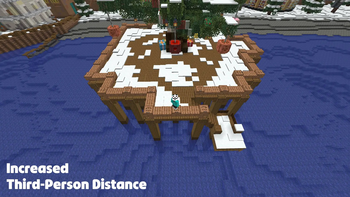

Usage
While in a third-person perspective (F5):
- Adjust distance by holding Left Alt (default) and using the Scroll Wheel (alternatively the slider in MC settings)
Features
Smooth Distance Adjustment
Hold a modifier key (Default: Left Alt) and scroll the mouse wheel to adjust your camera distance in real-time.
Configurable Smoothing
Enable or disable camera lerping for a cinematic zoom effect or instant feedback.
No Clip Mode (Mod required on the server #Modrinth EULA)
An optional toggle that allows the camera to pass through solid blocks instead of colliding with them.
ModMenu & Cloth Config Integration
Full support for ModMenu allows you to tweak every setting from the in-game menu.
Configuration
The following options are available via the configuration menu:
| Option | Description |
|---|---|
| Camera Distance | The current target distance of the third-person camera. |
| Minimum/Maximum Distance | Limits for how close or far the camera can go. |
| Scroll Sensitivity | Adjusts how much each scroll notch changes the distance. |
| Smoothing Speed | Controls how quickly the camera catches up to the target distance. |
| No Clip (server-mod) | Toggles whether the camera should ignore block collisions. |
| Vanilla Second Person | Toggle whether custom distances should apply to the front-facing (Second Person) view. |
Quick facts
- Edition: Minecraft Java
- File type: .jar
- Minecraft version listed: 26.2
- How to install: Install the matching mod loader (Forge, Fabric or NeoForge) for your Minecraft version. → Download the .jar. → Put it in the .minecraft/mods folder and launch that loader profile.
- Where to get it: Opens on Modrinth — not every file is mirrored on our own servers.
Install steps are the general flow for this file type — How to install Minecraft Java mods & modpacks walks through it step by step.
Verified by MCModsHub
- Ships as f5ranger-1.0.1+26.2.jar — drop this file into the mods folder
- Download size: 271 KB
- Download link checked 31 Aug 2026 — working
These come from our own check of the pack file, not from the source page.