


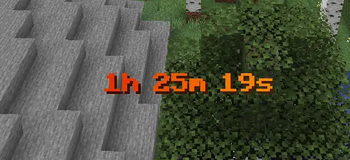


Challenge Timer
An advanced Minecraft Timer Mod for Challenges etc.
Tutorial: https://youtu.be/aHcGYtDmxuk
Features
- Countdown
- Countup (Stopwatch)
- multiple Timers supported
- Colors (names + hex-codes)
- Color Gradients (static & animated)
- customize animationtime + direction
- advanced Time Indication
- set Pre- & Suffix
- retime
- retype (count up/down)
- customize finished text (shown when the timer is over)
- format text (bold,underlined,..)
- pause timers
- customize pause text
Upcoming:
- more advanced formatting options
- assign timers to players
- more colors in gradients possible
Usage
How to add Countdown
  /timer add Countdown <Timername> <time>

  <time> given like "2d6h20m13s"

  Keywords:
  'd' : days
  'h' : hours
  'm' : minutes
  's' : seconds
How to add Stoppwatch
/timer add Countup <name> <time> Countup
How to start the Timer
/timer start <name>
How to reset the Timer
/timer reset <name>
How to remove Timer
/timer remove <name>
How to change the shown Timer
/timer set <name>
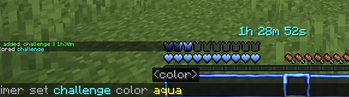
How to set Timer Color
/timer set <name> color <color(name or hex)>
How to use an animated Gradient
/timer set <name> color gradient <hex> <hex> animated
How to set Timer Time
/timer set <name> time <time>
How to set Pre/Suffix
  /timer settings prefix/suffix <prefix/suffix>

  ! the pre/suffix color is the default_color
How to set default Timer Color
/timer settings default_color <color(name or hex)>
How to let Pre/Suffix inherit from Timer Formattings
  /timer settings defaultColor useTimerFormattings

  ! fe gradients and formattings like bold/underlined
How to set finished-text (text shown after timer over)
  /timer settings finishedText <text>

  Keywords:
  {name} = name of current timer
How to pause/unpause
/timer pause
How to set paused-text (text shown after timer over)
  /timer settings pausedText <text>

  Keywords:
  {name} = name of current timer
  {time} = time of current timer
How to en/disable timers
/timer en/disable
System Infos
Minecraft Verion: Minecraft Java Fabric 1.21.5
Fabric Loader: 0.16.14 (usually preset)
🔗 Links


Authors
License
- Edition: Minecraft Java
- File type: .jar
- Minecraft version listed: 1.21.11
- How to install: Install the matching mod loader (Forge, Fabric or NeoForge) for your Minecraft version. → Download the .jar. → Put it in the .minecraft/mods folder and launch that loader profile.
- Where to get it: Opens on Modrinth — not every file is mirrored on our own servers.
Install steps are the general flow for this file type — How to install Minecraft Java mods & modpacks walks through it step by step.
- Ships as timer1.21.11-1.4.jar — drop this file into the mods folder
- Download size: 205 KB
- Download link checked 31 Aug 2026 — working
These come from our own check of the pack file, not from the source page.