
Inventory Slots
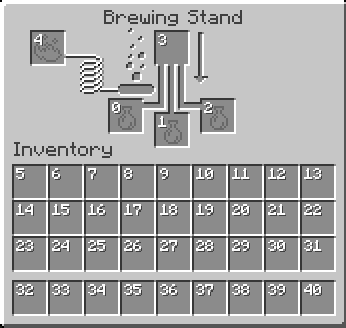
A Fabric Minecraft mod for viewing container slot index's at the click of a button! Useful for development/configuration!
⬇ Download on Modrinth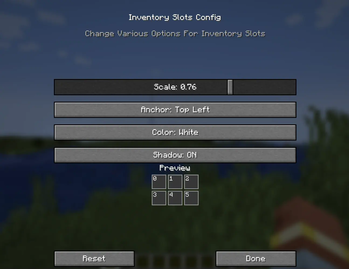
InventorySlots
InventorySlots is a lightweight Fabric mod designed for developers and UI configurators. It provides a client-side overlay for inventory slots, making it easier to visualize slot indices and debug layout positioning in real-time.
Features
The mod includes a built-in configuration menu that allows for live adjustments without requiring a game restart.
- Customizable text scale (0.25x to 2.0x) and hex color support.
- Multiple anchor points for precise text alignment (e.g., top-left, center, bottom-right).
- Optional text shadowing for better visibility against different UI textures.
- Persisted configuration settings across game sessions.
- Fully client-side implementation; compatible with all servers.
Keybinds
- Toggle Overlays:
HOME - Open Config Menu:
END
Note: Keybinds can be remapped via the standard Minecraft controls menu if they conflict with other mods.
Requirements
This mod requires Minecraft 1.21.4 or newer and the following dependencies:
- Fabric API
Support
For bug reports or feature requests, please submit an issue through the GitHub repository: https://github.com/BitByLogics/InventorySlots/issues
- Edition: Minecraft Java
- File type: .jar
- Minecraft version listed: 26.2
- How to install: Install the matching mod loader (Forge, Fabric or NeoForge) for your Minecraft version. → Download the .jar. → Put it in the .minecraft/mods folder and launch that loader profile.
- Where to get it: Opens on Modrinth — not every file is mirrored on our own servers.
Install steps are the general flow for this file type — How to install Minecraft Java mods & modpacks walks through it step by step.
- Ships as inventoryslots-2.0.5.jar — drop this file into the mods folder
- Download size: 24 KB
- Download link checked 31 Aug 2026 — working
These come from our own check of the pack file, not from the source page.