
Booster
I don't know my version or loader


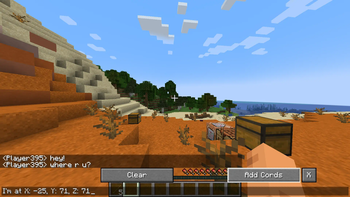
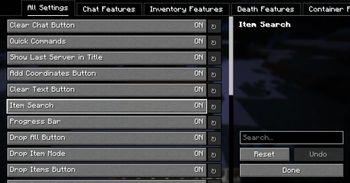
Booster is a sleek, smart, and slightly over-caffeinated Minecraft mod that supercharges your user interface without cluttering your screen or your soul.
Carefully crafted with usability in mind, Booster adds a whole bunch of quality-of-life improvements that feel like they should’ve been there all along. From quick inventory tweaks to smart buttons in all the right places, this mod was built to just work — and to look good doing it.
Perfect for casual players, hardcore adventurers, redstone engineers, or that one friend who opens ten chests a second looking for a pickaxe.
It’s lightweight, lightning-fast, and integrates smoothly with the game’s existing GUI systems. Oh, and it’s 100% client-side — so no server drama.
If you like your Minecraft clean, responsive, and just a little bit smarter... Booster’s got your back.


Current features:
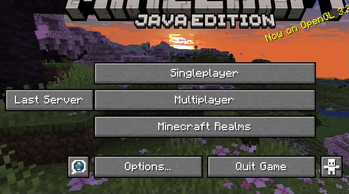
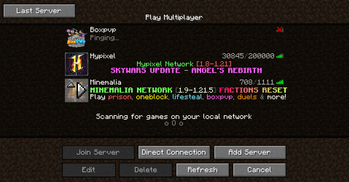
FeaturesLast Server button on Title Screen and Server Selection Screen.
TP Player & MSG Player buttons to the Social Ineraction Screen.
Reconnect button to the disconnected screen.
Steal & Store buttons, as well as Search bar, Steal/Store Selcted buttons, Fill Inventory/Chest Stacks buttons, Switch Inventories button, and Progressbar to the Container Screen (Chest, Barrel, etc.).
Infinite Craft & Clear Gird buttons to the Crafting Table Screen.
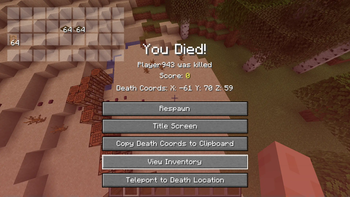
Death location text, as well as Copy Death Cords to Clipboard button, View Inventory button, and (only if player has OP permissions) TP to Death location button (Note: this button is still WIP, and may not work 100% properly), to the Death Screen.
Drop All button, as well as Drop Item Mode button, Drop Items button, Search bar, and Progressbar for Inventory Screen.
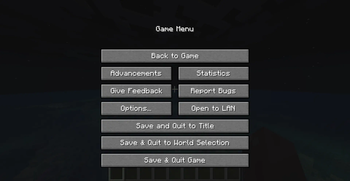
Save & Quit to world selection button, as well as Save & Quit Game button for Game Menu in Single player.
Disconnect & Quit to World Selection button, as well as Disconnect & Quit Game button to the Game Menu in Multiplayer.
Clear button to the Chat Screen, as well as Add Cords button & X button
In-game inventory overlay that opens when pressing a certain key.
Open Screenshots Folder button as well as a Booster Config (a shortcut to the Config Screen) button to the Options Screen.
Add All & Remove All buttons to the Resource Pack screen.
Config Screen for all of the features above.
YACL Config Screen for all of the features above.
Cloth Config Config Screen for all of the features above.
MidnightLib Config Screen for all of the features above.
Even includes an (admittedly outdated but still charming) How-to-Use screen.
And many more features are planned for the future!
And yes, it’s:
Fully client-side – no server install required.
Frequently updated – some days see multiple updates!
Designed to feel like a native part of the game.
Visit the Gallery to see it all in action.
Supported Languages:
Click to reveal the list of supported languagesBooster is designed to be accessible to players all over the world. Here’s a list of languages currently supported:
| Flag | Language Name | Native Name | Code | Completion |
|---|---|---|---|---|
| 🇺🇸 | English | English | en_us | 100% |
| 🇪🇸 | Spanish | Español | es_es | 97% |
| 🇫🇷 | French | Français | fr_fr | 97% |
| 🇩🇪 | German | Deutsch | de_de | 97% |
| 🇯🇵 | Japanese | 日本語 | ja_jp | 97% |
| 🇷🇺 | Russian | Русский | ru_ru | 97% |
| 🇨🇳 | Simplified Chinese | 简体中文 | zh_cn | 92% |
| 🇰🇷 | Korean | 한국어 | ko_kr | 97% |
| 🇸🇦 | Arabic | العربية | ar_eg | 97% |
| 🇳🇱 | Dutch | Nederlands | nl_nl | 97% |
| 🇮🇱 | Hebrew | עברית | he_il | 95% |
If you notice any translation mistakes or want to contribute to the translations, feel free to reach out!
Dependencies:
Required- Fabric API – This mod wouldn’t work without the fabric API. It’s the backbone for all of Booster’s features.
Mod Menu – For a convenient mod list in the main menu.
Catalogue – A great way to manage your mod collection directly from the game.
YACL – If you prefer a different config screen layout.
Cloth Config – Another option for managing Booster’s settings in-game.
MidnightLib – A helpful library to enhance Booster’s configuration options.
Booster runs perfectly well with just Fabric API, but if you want a more customized experience, feel free to try out any of the optional mods listed above!
Configuration:
Configuration methodsBooster is all about making your life easier — and that includes how you configure it.
As of version 1.3, you can choose exactly which UI elements appear in your game. Don’t like a button? Turn it off. Want everything? Go wild. Future versions will give you even more control (seriously, it’s on the to-do list).
🛠️ How do I configure Booster?
Simple! There are three ways to reach the config screen — choose your favorite adventure:
In-Game Menu
PressESC→Options→Booster Config
(Yes, it’s right there. Super convenient.)Mod Menu (If installed)
Head to the Mod Menu - Well, menu - find Booster, and click the ✨Configure...✨ button.Catalogue (If installed)
Same idea — open the Catalogue menu, find Booster, and pressConfig.
All of these options will take you to the magical Config Screen Selection Screen.
(Try saying that five times fast. We dare you)
Choose your flavor of config screen:
Booster’s built-in config screen (Recommended. Built with love)
⚠️ Note: If a button is grayed out or doesn’t work, it means you’re missing the required mod for that screen. Either install it, or use one of the others. No config left behind.
Credits
Click to reveal credits and acknowledgementsBig thanks to the following:
The Modrinth moderation team for their incredible support and guidance throughout the development process!
All the contributors to the translations, especially those who helped fine-tune the languages and make Booster accessible to more players.
Mod developers whose mods and APIs (like YACL, Cloth Config, and MidnightLib) were used to enhance Booster’s configurability.
The Minecraft community for the continuous feedback and encouragement — it really helps make this mod better!
Without these people and resources, Booster wouldn’t be what it is today. Cheers!
Warnings
Click to reveal the (not-so-scary) warningsSome of the features are still in beta. That means things might break, behave weirdly, or just decide to stop working for no reason. Use with a bit of caution — and maybe a backup or two.
If you're playing in windowed mode, some buttons might overlap or get cozy in awkward places. (Fixed)
Most translations were created using AI. While pretty smart, it’s not perfect — so some phrases might sound a bit... robotic. If you spot something strange, feel free to let me know or send corrections!
FAQ:
Frequently asked Questions🔓 Why isn't this mod open source? Hmmm? Are you hiding something?
Nope!
This mod isn't open source for one simple reason:
I'm too lazy to upload it to GitHub.
But don’t worry — I usually include a sources file with every release I upload.
📦 Can I include this mod in my modpack?
Da! Sure!
Feel free to add it to your modpack.
🧭 What versions does the mod support?
Technically:
- 1.20.1
- 1.21 - 1.21.4
However, the 1.20.1 builds are very old and no longer updated.
👉 I recommend using the 1.21.x versions.
🔧 Can I release this mod for a newer version or different mod loader?
Yes, but with two conditions:
- The version you're releasing must not already exist in the original project.
- You must give credit to the original creator (that's me!).
Is this mod compatible with Inventory Profiles Next?
Since every feature in this mod can be turned on and off, it is compatible with any mod!
🕹️ How do I use this mod?
Most of the buttons are pretty self-explanatory — plus, the mod is translated into many languages!
Still confused? Try checking the mod’s built-in "How to Use" screen.
If that doesn't help (and let’s be honest, it probably won’t — it’s very outdated), just leave a comment.
I'll reply within about 24 hours.
🐛 What should I do if I find a bug or issue?
Post a detailed explanation of the problem right here, and I’ll fix it as fast as I can.
If you see this, I hope you have a wonderful day.
Did you like this project? Follow it!
- Edition: Minecraft Java
- File type: .jar
- Minecraft versions listed: 1.21, 1.21.1, 1.21.2
- How to install: Install the matching mod loader (Forge, Fabric or NeoForge) for your Minecraft version. → Download the .jar. → Put it in the .minecraft/mods folder and launch that loader profile.
- Where to get it: Opens on Modrinth — not every file is mirrored on our own servers.
Install steps are the general flow for this file type — How to install Minecraft Java mods & modpacks walks through it step by step.
- Ships as Booster-1.3.12-1.21+1.21.4.jar — drop this file into the mods folder
- Download size: 2.3 MB
- Download link checked 31 Aug 2026 — working
These come from our own check of the pack file, not from the source page.