Gravity Pads
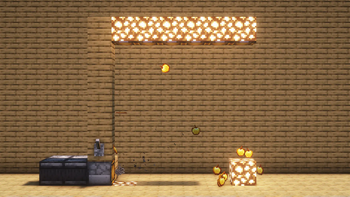
Just a simple Gravity Pad mod.
Explanation
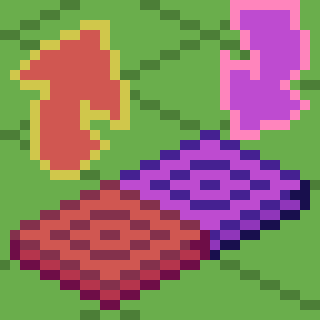
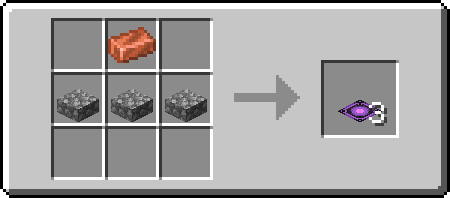
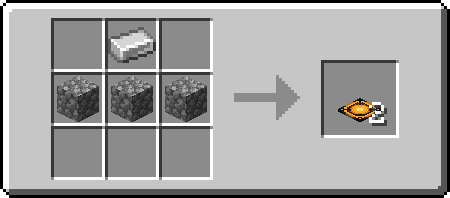
Pushing Gravity Pads (Orange) sets your gravity to the direction it's facing, while Pulling Gravity Pads (Purple) sets your gravity to the direction its facing away from (Think of it as pulling).
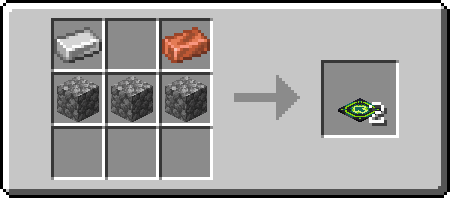
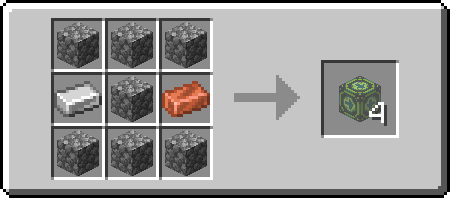
Directional Gravity Pad/Block allow you to choose the direction that the gravity will go by targeting the edge of a block when placing. Targeting center of the block will place a "towards" directional pad/block (signified by the + sign, the gravity direction is towards to player). Sneak placing will invert the direction you are placing. Placing targeting the center of the block while sneaking will result in an "away" directional pad/block (signified by a ◼ square, the gravity direction is away from the player). You can also rotate it using a wrench (configurable) using the side you right click as rotation axis.
The mod also comes with anti-softlock. It triggers when you are 64 blocks above the block height limit (configurable) and will reverse your gravity back to normal (configurable).
Recipes
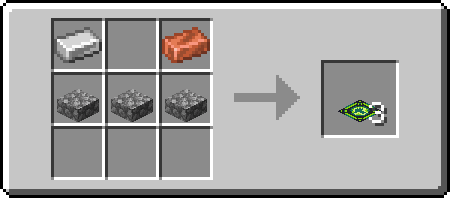
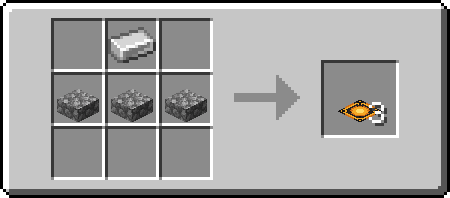
Pulling
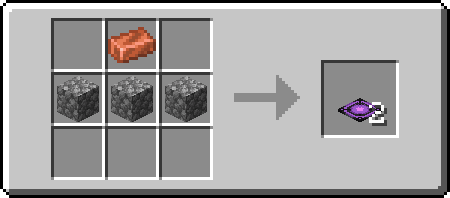
Pushing
Directional
- Edition: Minecraft Java
- File type: .jar
- Minecraft version listed: 1.20.1
- How to install: Install the matching mod loader (Forge, Fabric or NeoForge) for your Minecraft version. → Download the .jar. → Put it in the .minecraft/mods folder and launch that loader profile.
- Where to get it: Opens on Modrinth — not every file is mirrored on our own servers.
Install steps are the general flow for this file type — How to install Minecraft Java mods & modpacks walks through it step by step.
- Ships as gravity_pads-1.3.0+1.20.1.jar — drop this file into the mods folder
- Download size: 674 KB
- Download link checked 31 Aug 2026 — working
These come from our own check of the pack file, not from the source page.