
ModsJava
G and L Chat
To send to the Global Chat, you need to put before the message ( ! ) The local chat is visible up to 50 blocks away from the player.
⬇ Download on Modrinth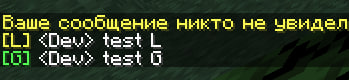
Hi, I quickly created my mod, so unfortunately you won't be able to change its configuration (probably). I created this mod for small servers with support for mods only. I hope you enjoy the mod. The translation of the message, which is highlighted in yellow: "No one saw your message." If I have the strength to make an update to this mod by adding a config (if at all I can do it, lol),
Quick facts
- Edition: Minecraft Java
- File type: .jar
- Minecraft version listed: 1.20.1
- How to install: Install the matching mod loader (Forge, Fabric or NeoForge) for your Minecraft version. → Download the .jar. → Put it in the .minecraft/mods folder and launch that loader profile.
- Where to get it: Opens on Modrinth — not every file is mirrored on our own servers.
Install steps are the general flow for this file type — How to install Minecraft Java mods & modpacks walks through it step by step.
Verified by MCModsHub
- Ships as chat_plus_forge-1.1.1-forge-1.20.1.jar — drop this file into the mods folder
- Download size: 87 KB
- Download link checked 31 Aug 2026 — working
These come from our own check of the pack file, not from the source page.