
Note that the beta versions can crash Minecraft.
See the Bugs / Issues / Crashes section for more info on how to send feedback.
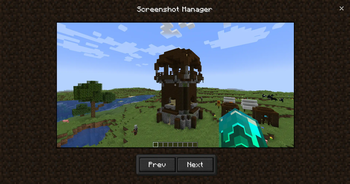
Screenshot Manager
Adds a menu for showing screenshots you've taken.
Features
Full screen menu, with a toolbar at the bottom, to close it there's a close button at top right.
Adds a button in the title screen to access the screenshots menu.
Source code
It's on GitHub: Ultreon/screenshot-manager (github.com)
Links
Qboi123 - (Youtube, GitHub)
Ultreon Team - (Youtube, GitHub, Website)
Bugs / Issues / Crashes
In Alpha / Beta releases stuff might change or break, it's recommended to use them for testing purposes only.
If there's a problem with the mod: don't post the crash report in the comments, but post it on the issue tracker here: Screenshot Manager Issues at GitHub.
If there's no crash report but it still crashes, post the debug.log file in your .minecraft/logs folder to the issue tracker.
If there's no crash report and there's no crash in the debug.log, then there's probably a problem with the Java installation or a windows driver (what I have sometimes).
Feature requests
If you want to request a feature you can do it on GitHub.
- Edition: Minecraft Java
- File type: .jar
- Minecraft version listed: 1.20.1
- How to install: Install the matching mod loader (Forge, Fabric or NeoForge) for your Minecraft version. → Download the .jar. → Put it in the .minecraft/mods folder and launch that loader profile.
- Where to get it: Opens on Modrinth — not every file is mirrored on our own servers.
Install steps are the general flow for this file type — How to install Minecraft Java mods & modpacks walks through it step by step.
- Ships as screenshot-manager-2.1.0.jar — drop this file into the mods folder
- Download size: 45 KB
- Download link checked 31 Aug 2026 — working
These come from our own check of the pack file, not from the source page.