
StickerBomb!
Add an *explosive* splash of colour to your Minecraft world with stickers! decorate your builds or graffiti your friends' with these sticky crowd…
⬇ Download on Modrinth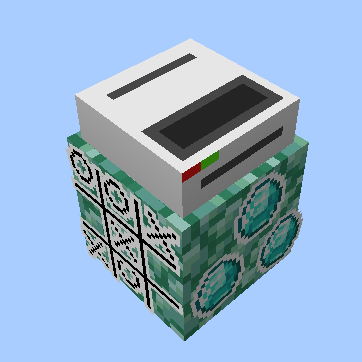

A mod that adds stickers! (but no bombs)
Stickers are small textures that you can place in the world to add more life, decor, and character to your builds. You can also play games like tic-tac-toe with stickers!
Content
Stickers! (obviously)
Stickers can be crafted at the Sticker Printer. When holding a sticker, you'll get a preview of how the sticker will look in-world before you place it.
For server admins, you can use the /give command with the component sticker_data={isAdmin=true} to make admin stickers, which can't be removed unless you're in creative mode.
There's also temporary stickers, which only last for 30 seconds, and do not drop as items when removed (either by a scraper or by timing out)
Sticker Scraper
This item simply alows you to remove stickers. Right-clicking the face of a block with the scraper will remove all stickers attached to that face of the block.
The sticker scraper currently has no recipe.
Sticker Printer
Lets you turn blank stickers into printed stickers. Place any dye into the top slot, and a blank sticker (crafted with paper and a slime ball) into the bottom slot. Then, type the ID of the sticker in the middle, and congratz! You have yourself a brand new sticker.
For server admins, you can make a Temporary Sticker Printer, which only prints temporary stickers. Using the /give command, add the component custom_data={"temp"=true} to the sticker printer, and then place it. Any stickers made from that printer will be temporary.
Sticker printers currently have no recipe.
- Edition: Minecraft Java
- File type: .jar
- Minecraft version listed: 1.21.8
- How to install: Install the matching mod loader (Forge, Fabric or NeoForge) for your Minecraft version. → Download the .jar. → Put it in the .minecraft/mods folder and launch that loader profile.
- Where to get it: Opens on Modrinth — not every file is mirrored on our own servers.
Install steps are the general flow for this file type — How to install Minecraft Java mods & modpacks walks through it step by step.
- Ships as stickerbomb-0.1.3+fabric-1.21.8.jar — drop this file into the mods folder
- Download size: 165 KB
- Download link checked 31 Aug 2026 — working
These come from our own check of the pack file, not from the source page.