
ModsJava
Helpful Crosshair
Java mod listed for Minecraft 26.x. Downloads from the MC Java Mods app on Android.
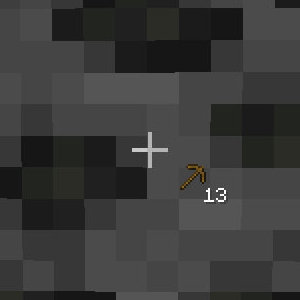
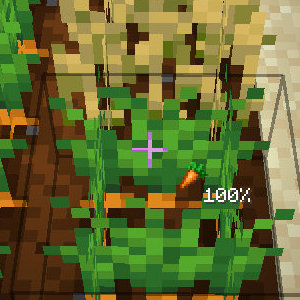
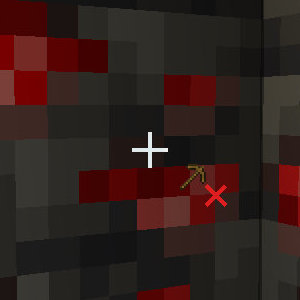
Helpful Crosshair 1.21.11 -> 1.21.5 | Fabric Adds useful, quality of life, indicators ("hints") next to the crosshair! Here's what they look like…
⬇ Download on Modrinth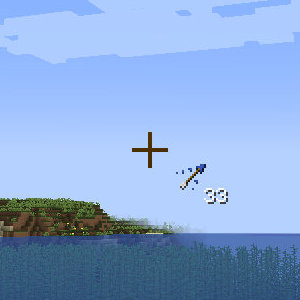
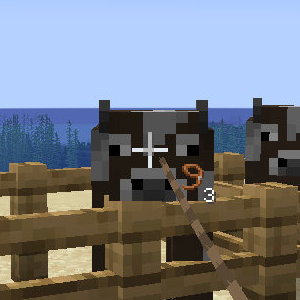
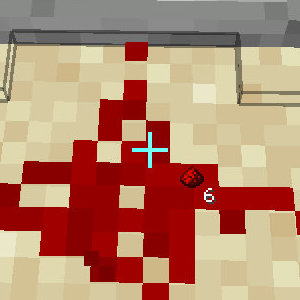

Helpful Crosshair
1.21.11 -> 1.21.5 | Fabric
Adds useful, quality of life, indicators ("hints") next to the crosshair!
Here's what they look like:
Configuration
The helpful_crosshair.config.json file will be generated when you first load the game with the mod. You can enable/disable hints here!
Example (last updated v0.1):
{
  "hints": [
    {
      "identifier": "incorrect_tool",
      "enabled": true
    },
    {
      "identifier": "tool_durability",
      "enabled": true
    },
    {
      "identifier": "arrow_count",
      "enabled": true
    },
    {
      "identifier": "redstone_level",
      "enabled": true
    },
    {
      "identifier": "leashed_mobs",
      "enabled": true
    },
    {
      "identifier": "crop_growth",
      "enabled": true
    }
  ]
}
Quick facts
- Edition: Minecraft Java
- File type: .jar
- Minecraft version listed: 26.2
- How to install: Install the matching mod loader (Forge, Fabric or NeoForge) for your Minecraft version. → Download the .jar. → Put it in the .minecraft/mods folder and launch that loader profile.
- Where to get it: Opens on Modrinth — not every file is mirrored on our own servers.
Install steps are the general flow for this file type — How to install Minecraft Java mods & modpacks walks through it step by step.
File checked by MCModsHub
- Ships as helpful-crosshair_mc26.2_v-0.2.jar — drop this file into the mods folder
- Download size: 36 KB
- Download link checked 11 Oct 2026 — working
These come from our own check of the pack file, not from the source page.