
Chest Inv Sort
Java mod listed for Minecraft 1.20. Downloads from the MC Java Mods app on Android.
This mod lets you sort your blocks and items in chests and player inventory. Simply press your configured key when your player inventory is openend or…
⬇ Download on Modrinth
ChestInvSort
Chest and Inventory Sorting [Client/Server]
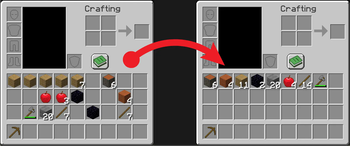
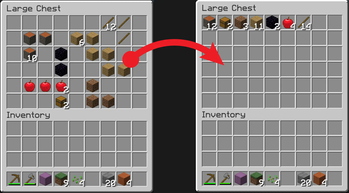
This mod lets you sort your blocks and items in chests and player inventory. Simply press your configured key when your player inventory is opened or when you are interacting with a chest (opened chest menu). The items will be sorted by type (block > item) first, then by name (A > Z).
By default, the middle mouse button sorts the items.
This mod needs to be present on client and server.
Customization
You can specify which button on your keyboard or mouse you assign to sorting your items.
Change this in your settings under Options->Controls->Key binds->ChestInvSort Mod.
- Edition: Minecraft Java
- File type: .jar
- Minecraft version listed: 1.20.6
- How to install: Install the matching mod loader (Forge, Fabric or NeoForge) for your Minecraft version. → Download the .jar. → Put it in the .minecraft/mods folder and launch that loader profile.
- Where to get it: Opens on Modrinth — not every file is mirrored on our own servers.
Install steps are the general flow for this file type — How to install Minecraft Java mods & modpacks walks through it step by step.
- Ships as chestinvsort-1.20.6-1.2.0.jar — drop this file into the mods folder
- Download size: 25 KB
- Download link checked 11 Oct 2026 — working
These come from our own check of the pack file, not from the source page.