
LinguaChat
Fabric mod for automatic bidirectional chat translation. Supports multiple providers: Google Translate, DeepL, and Kagi.
⬇ Download on Modrinth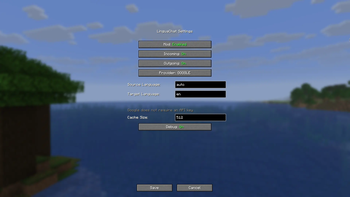
LinguaChat makes your communication in Minecraft accessible in any language, automatically translating chat messages without interrupting gameplay!
You can configure the translation directions for both sides (Client/Server) in the configuration file See description below.
📥 Installation
- Install Fabric Loader for your Minecraft version
- Install Fabric API matching your version
- Download LinguaChat for your version
For official Minecraft Launcher:
- Place the JAR file in your
modsfolder:- Windows:
%APPDATA%\.minecraft\mods - Linux:
~/.minecraft/mods - macOS:
~/Library/Application Support/minecraft/mods
- Windows:
For Prism Launcher and other instance-based launchers:
- Open instance settings → Mods tab
- Click Add / Install Mods and select the JAR file
- Make sure Fabric API is installed for this instance
Final step:
- Launch Minecraft with Fabric profile
📝 Usage Example
When properly configured, the mod automatically translates messages:
Player1: привет
[Chat for you]: hello

Player2: hello
[Chat for you]: привет
[!TIP] The original text of the message is available by hovering over the translated message!
⚙️ Configuration
Mod settings are accessible via the K key in-game.
You can also edit the file directly: config/linguachat.json
Keybinds
| Key | Action |
|---|---|
| K | Open settings screen |
| N | Toggle outgoing message translation |
Settings
| Parameter | Default | Description |
|---|---|---|
enabled |
true |
Enable/disable the mod |
translateIncoming |
true |
Translate incoming messages |
translateOutgoing |
true |
Translate outgoing messages |
defaultSourceLang |
"auto" |
Source language (auto for detection) |
defaultTargetLang |
"en" |
Target language for both incoming messages (messages from other players) and outgoing messages (your messages sent to server) |
preferredTranslator |
"google" |
Provider: google, deepl, kagi |
deeplApiKey |
"" |
DeepL API key |
kagiApiKey |
"" |
Kagi API token |
kagiSessionToken |
"" |
Kagi session token |
showOriginalOnHover |
true |
Show original on hover |
cacheSize |
512 |
Translation cache size |
debugMode |
false |
Debug logging |
Translation Providers
| Provider | Cost | API Key | Languages |
|---|---|---|---|
| Free | Not required | 100+ | |
| DeepL | Free/Paid | Get API Key | 30+ |
| Kagi | Kagi Pass | API Token (settings/api) or Session Token (settings/user_details) | Multiple |
🐛 Reporting Issues
Found a bug or have a suggestion? Create an issue:
👉 https://github.com/Lintech-1/LinguaChat/issues
Please include:
- Minecraft version
- Mod version
- Log excerpts
- Steps to reproduce
- Edition: Minecraft Java
- File type: .jar
- Minecraft version listed: 1.21.11
- How to install: Install the matching mod loader (Forge, Fabric or NeoForge) for your Minecraft version. → Download the .jar. → Put it in the .minecraft/mods folder and launch that loader profile.
- Where to get it: Opens on Modrinth — not every file is mirrored on our own servers.
Install steps are the general flow for this file type — How to install Minecraft Java mods & modpacks walks through it step by step.
- Ships as linguachat-1.21.11-2.0.0.jar — drop this file into the mods folder
- Download size: 385 KB
- Download link checked 31 Aug 2026 — working
These come from our own check of the pack file, not from the source page.