
Custom Splashes
Java mod listed for Minecraft 1.19. Downloads from the MC Java Mods app on Android.
⬇ Download on Modrinth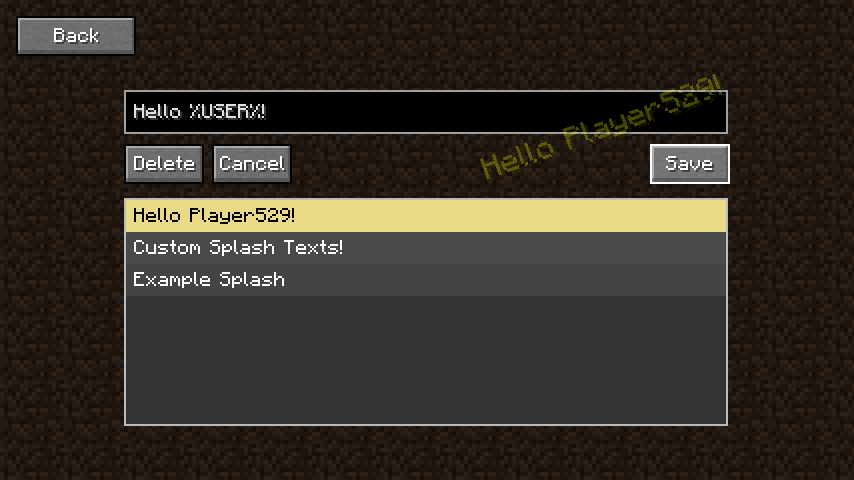
What does this mod do?
This mod allows you to add your own splashes to the title screen using a simple in game GUI
How do I add a splash?
Click on the "Splashes" button in the top right of the title screen and it will bring you to the splashes GUI. From here you can type a splash you want into the box and click "Add". If you want to delete or edit a splash you can scroll through the list to find a splash, then click on it to edit it. With the splash selected you also have the option to delete the splash.
I want to hide the button on the title screen?
Go to the config file at config/custom_splash_text.json and set show_title_screen_button to false. This is perfect if you want to include the mod in a modpack to add custom splashes to the title screen, however don't want the user to be able to modify them.
Something is broken / doesn't work
Please let me know in the comments below so I can fix it.
- Edition: Minecraft Java
- File type: .jar
- Minecraft version listed: 1.19.4
- How to install: Install the matching mod loader (Forge, Fabric or NeoForge) for your Minecraft version. → Download the .jar. → Put it in the .minecraft/mods folder and launch that loader profile.
- Where to get it: Opens on Modrinth — not every file is mirrored on our own servers.
Install steps are the general flow for this file type — How to install Minecraft Java mods & modpacks walks through it step by step.
- Ships as custom_splash_text-1.0.0.jar — drop this file into the mods folder
- Download size: 12 KB
- Download link checked 11 Oct 2026 — working
These come from our own check of the pack file, not from the source page.