Just Make Paintings Transparent
I don't know my version or loader
Just Make Paintings Transparent is a mod that makes paintings (and a few other entities) support multple forms of transparency, for use with resource packs.
The entities supported so far are:
- paintings;
- end crystals;
- and item frames (glow item frames included).
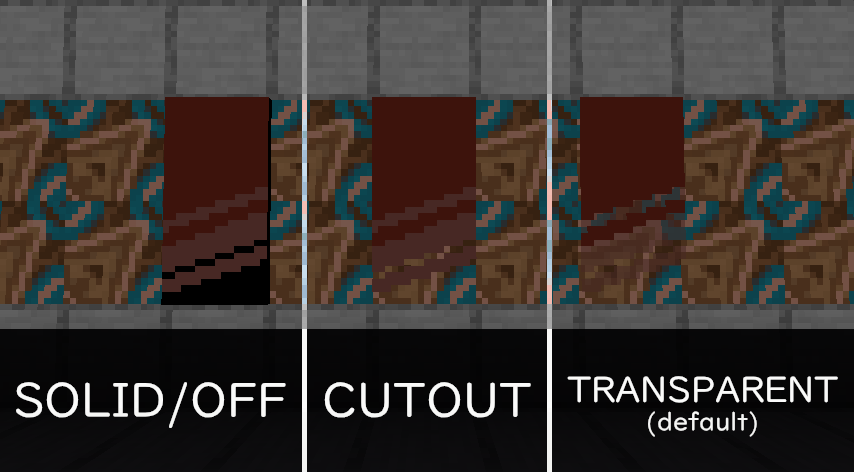
By default, all supported entities are set to TRANSPARENT. A config file is provided to let you individually select the transparency level for each entity, found as jumapat.mcf in your game's configs folder. The valid choices for each entity are SOLID/OFF (the default for the entity), CUTOUT (equivalent to CutoutNoCull) and TRANSPARENT (equivalent to Translucent). If you don't understand what any of this means - unless you're optimizing for every last bit of performance, the default settings should be good enough.
- Edition: Minecraft Java
- File type: .jar
- Minecraft versions listed: 1.21.2, 1.21.3, 1.21.4
- How to install: Install the matching mod loader (Forge, Fabric or NeoForge) for your Minecraft version. → Download the .jar. → Put it in the .minecraft/mods folder and launch that loader profile.
- Where to get it: Opens on Modrinth — not every file is mirrored on our own servers.
Install steps are the general flow for this file type — How to install Minecraft Java mods & modpacks walks through it step by step.
- Ships as jumapat-fabric-2.0.0.jar — drop this file into the mods folder
- Download size: 14 KB
- Download link checked 31 Aug 2026 — working
These come from our own check of the pack file, not from the source page.