Khat - Chat To Discord
I don't know my version or loader

About
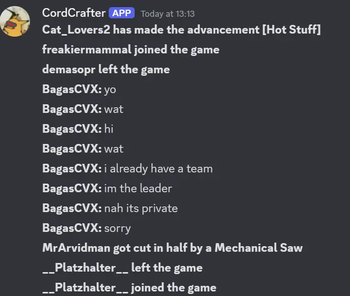
Khat is a Minecraft mod that creates a bridge between your Discord and Minecraft server. You give it a webhook and a bot token, and it can create a seamless experience for you and your players.
It contains several built-in features:
- Sending Player Messages.
- Sending Game Messages (e.g. Deaths, Advancements).
- Sending Command Messages (e.g. /say).
- Sending a Start and Stop message for the respective server lifecycle events.
- Sending Discord messages straight back to the server.
- Letting you link your profile with Minecraft.
- And also, before your message is sent, it goes through some necessary Compatibility handlers, which most mods lack:
- The message is modified to negate global pings (e.g.
@everyone). - The message is modified to negate invite links.
- The message is modified to negate any role pings that you don't allow in Config.
- The message and player names in it are modified to bypass Discord's native Markdown features (such as Cursive text).
- When sharing a waypoint using Xaero's Mini-/Worldmap, it displays a very "weird" message, this message can actually be deciphered using some logic, and this mod rewrites your message to be more legible.
- The message is modified to negate global pings (e.g.
- If the server crashes, a specialised embed will be sent, displaying the main cause, and also linking to an automatically made Mclogs Site!
And so much more! Check out all the available functions by checking the docs, or trying them out yourself.
Furthermore, you can also download versions of the mod without certain major functionalities, like the bot mode. A good example of this is only including the kRPC server, and having your own custom bot interact with your server!
- Edition: Minecraft Java
- File type: .jar
- Minecraft versions listed: 26.1, 26.1.1, 26.1.2
- How to install: Install the matching mod loader (Forge, Fabric or NeoForge) for your Minecraft version. → Download the .jar. → Put it in the .minecraft/mods folder and launch that loader profile.
- Where to get it: Opens on Modrinth — not every file is mirrored on our own servers.
Install steps are the general flow for this file type — How to install Minecraft Java mods & modpacks walks through it step by step.
- Ships as ctd-2.0.4+26.1.2-full.jar — drop this file into the mods folder
- Download size: 56.2 MB
- Download link checked 31 Aug 2026 — working
These come from our own check of the pack file, not from the source page.