

Ranky - Minecraft Title Management Mod
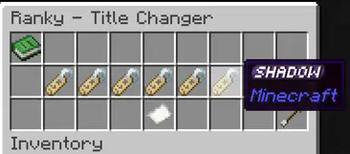
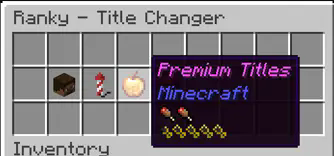
Effortlessly manage server titles with Ranky, a server-side Fabric mod introducing a GUI-based system for unlocking and managing titles via advancements!
Features:
- Chest-Based GUI: Intuitive title selection.
- Advancement Unlocks: Earn titles through achievements.
- Configurable: Customize titles via JSON.
- Pagination Support: Handle large title lists easily.
- Server-Side Security: Safe and reliable.
- Reload Config: Update titles without restarting.
- Aliases: Use
/titlesor/ranksto open the GUI.
Commands:
/titlesor/ranks: Opens the title selection GUI (all players)./ranky reload: Reloads configuration (op level 4).
Config Example:
Located in config/ranky_titles.json:
[
  {
    "name": "Noob",
    "command": "say %player% is now a Noob",
    "item": "minecraft:name_tag",
    "requirements": []
  },
  {
    "name": "Veteran",
    "command": "say %player% is now a Veteran",
    "item": "minecraft:diamond",
    "requirements": ["minecraft:story/mine_diamond"]
  }
]
Fields:
name: Title display name.command: Runs when selected (%player%= player name).item: GUI button (Minecraft item ID).requirements: List of required advancement IDs.
Common Advancements:
minecraft:story/mine_diamond: Acquire diamonds.minecraft:nether/find_fortress: Discover a Nether Fortress.minecraft:end/kill_dragon: Defeat the Ender Dragon.
Adding Titles:
- Stop the server.
- Edit
config/ranky_titles.json. - Add new entries.
- Save and restart or use
/ranky reload.
Permissions:
/titlesor/ranks: Accessible to all players./ranky reload: Operator-only.
Make titles an exciting, customizable feature with Ranky!
Here’s an example test configuration for Ranky with LuckPerms support to create a cosmetic rank:
[
    {
        "name": "Overlord",
        "setCommand": "lp user {player} parent add Overlord",
        "removeCommand": "lp user {player} parent remove Overlord",
        "item": "minecraft:name_tag",
        "requirements": [
            "dystorian-adventures:cosmeticranks/overlord"
        ]
    }
]
Quick facts
- Edition: Minecraft Java
- File type: .jar
- Minecraft version listed: 1.21.1
- How to install: Install the matching mod loader (Forge, Fabric or NeoForge) for your Minecraft version. → Download the .jar. → Put it in the .minecraft/mods folder and launch that loader profile.
- Where to get it: Opens on Modrinth — not every file is mirrored on our own servers.
Install steps are the general flow for this file type — How to install Minecraft Java mods & modpacks walks through it step by step.
Verified by MCModsHub
- Ships as ranky-1.6.0+1.21.1.jar — drop this file into the mods folder
- Download size: 23 KB
- Download link checked 31 Aug 2026 — working
These come from our own check of the pack file, not from the source page.