
Color Pointers (Fabric and NeoForge)

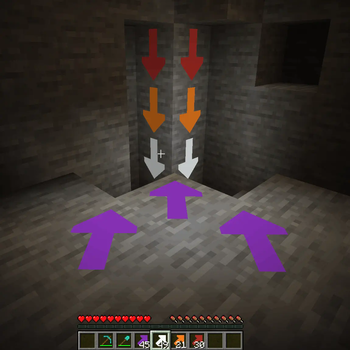
Allows you to place high contrast arrow pointers on any full block to aid you on your mining journeys. Never lose your way again.
Hitting the corner of a block places an arrow pointing in that direction, hitting the center creates an X.
The placed arrows emit a faint light, and they are visible even in the dark.
License
Standard MIT license. Feel free to learn from it and incorporate it in your own projects.
Source code
Available on GitLab or on GitHub.
For developers
Quite often, when I start learning programming on a new platform, I find even the simplest examples too complicated.
Tutorials, written by experts, with years of experience programming on that platform, sometimes forget how difficult those first step are.
This is why I decided to make my first Minecraft mods publicly available.
Requires (Fabric)
Recommended addons
Iron Signs is a good companion mod to place matching color signs next to the arrows.
Alternative addons
Arrow Pointers allows you to mark your way with vanilla arrows.
Chalk provides a different way to mark your path with arrows.
And Chalk: Colorful Addon adds variants of chalk in every color!
See also
My other mods on Modrinth and on CurseForge.
- Edition: Minecraft Java
- File type: .jar
- Minecraft version listed: 26.2
- How to install: Install the matching mod loader (Forge, Fabric or NeoForge) for your Minecraft version. → Download the .jar. → Put it in the .minecraft/mods folder and launch that loader profile.
- Where to get it: Opens on Modrinth — not every file is mirrored on our own servers.
Install steps are the general flow for this file type — How to install Minecraft Java mods & modpacks walks through it step by step.
- Ships as colorpointers-1.2.0+neo+mc26.2.jar — drop this file into the mods folder
- Download size: 186 KB
- Download link checked 31 Aug 2026 — working
These come from our own check of the pack file, not from the source page.