Warning
The mod is very unstable, as it requires a complete rewrite of the code. At the moment I'm working on another mod, so when the opportunity arises, FeyFriends will be rewritten. However, I will continue to update the mod for new versions of Minecraft.
FeyFriends
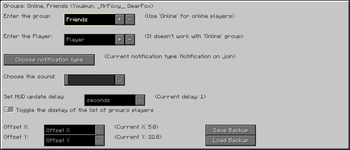
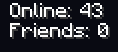
The mod shows the number of players from certain groups on the screen, default - in the left top corner. If desired, you can turn on the sound of notifications when the number of players changes, display the full list of players, etc. To customize the display of groups and notifications, use the GUI (default button is "H") ((NOT THE MODMENU BUTTON)). The mod also adds a keybind to display the full list of online players and their number in the chat (default - "J"); keybind for displaying all categories and players in them in the chat (default - "O").
Since version 0.4.0, you can use the /feyfriends <args> command instead of the GUI to edit groups.
Discord
- Edition: Minecraft Java
- File type: .jar
- Minecraft version listed: 1.20.2
- How to install: Install the matching mod loader (Forge, Fabric or NeoForge) for your Minecraft version. → Download the .jar. → Put it in the .minecraft/mods folder and launch that loader profile.
- Where to get it: Opens on Modrinth — not every file is mirrored on our own servers.
Install steps are the general flow for this file type — How to install Minecraft Java mods & modpacks walks through it step by step.
- Ships as feyfriends-1.20.2-0.4.1.jar — drop this file into the mods folder
- Download size: 454 KB
- Download link checked 21 Sept 2026 — working
These come from our own check of the pack file, not from the source page.