
Description
Automatically detects common configuration issues at game startup and It can also show a must-read notice before you reach the main menu. What it checks:
- Memory allocation (warns if you allocated too little or way too much RAM)(Default: false)
- GPU configuration (detects if the game is running on integrated graphics when you have a dedicated GPU available)(Default: false)
What you can customize:
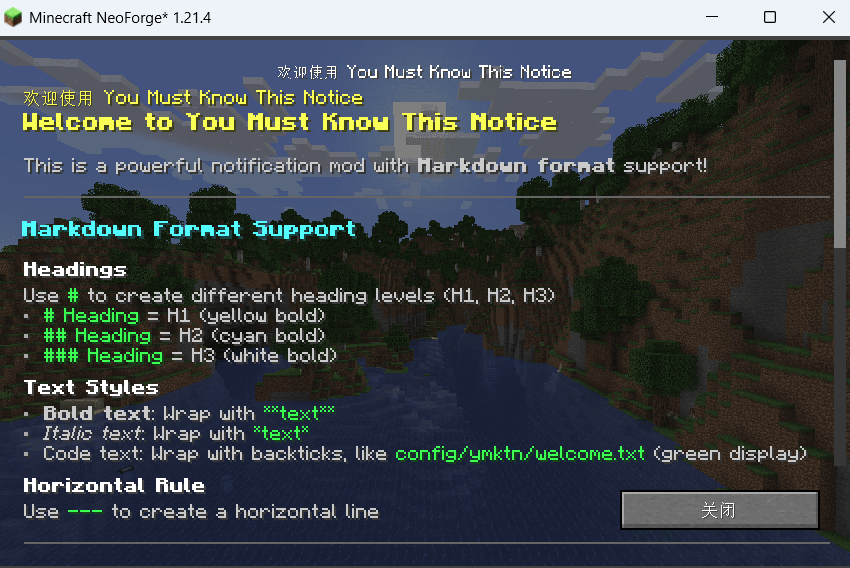
- Welcome messages with full Markdown support (headings, bold, italic, code blocks, clickable links)
- To prevent players from skipping it too quickly, the notice confirmation time can be customized in the config (default: 9 seconds).
- Custom background images for the welcome screen
- Detection thresholds for each check (or disable checks you don't need)
- Modpack information display (name, version, support URL)
- The warning screen
Display images:
Quick facts
- Edition: Minecraft Java
- File type: .jar
- Minecraft version listed: 1.21.4
- How to install: Install the matching mod loader (Forge, Fabric or NeoForge) for your Minecraft version. → Download the .jar. → Put it in the .minecraft/mods folder and launch that loader profile.
- Where to get it: Opens on Modrinth — not every file is mirrored on our own servers.
Install steps are the general flow for this file type — How to install Minecraft Java mods & modpacks walks through it step by step.
Verified by MCModsHub
- Ships as ymktn-1.21.4_1.0.1.jar — drop this file into the mods folder
- Download size: 1.1 MB
- Download link checked 31 Aug 2026 — working
These come from our own check of the pack file, not from the source page.