
ModsJava
Sublanguage
Sublanguage (首选语言) is a simple mod that provides additional language configuration options for clients. It includes features such as bilingual display of…
I don't know my version or loader
Open the Minecraft launcher and look at the profile you play on — it names both, like fabric-loader-1.21.4. The version also shows in the bottom-right corner of the game's main menu.
No loader in the profile name? Then it's plain Minecraft, and these mods won't run — you need Fabric or NeoForge installed first.
首选语言 Sublanguage
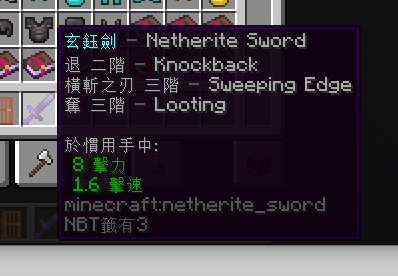
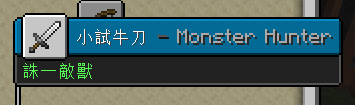
这是一款功能简单的模组,为客户端提供更多语言配置项,包括物品名双语显示、第二语言。十分适合模组缺少本地翻译或学习其他语言的玩家。当然用户还可以借助该功能对一些物品备注。双语显示效果如模组封面,会更改物品提示框中的标题和切换手中物品的小标题内容。
正常情况下游戏将会优先翻译为首选的语言,其次为第二语言、英语,开启双语显示后若物品没有自定义名称,且首选语言和第二语言的翻译都存在,将在提示框中以[首选][分隔符][第二]的格式显示物品名。
- v1.2 新增成就标题、旗帜图案的双语显示,背包里状态效果图标也可支持双语。
- v1.1 支持附魔属性、药水效果等双语显示。

配置教程
本模组的默认第二语言为台湾繁体(zh_tw),且双语显示功能默认关闭,两种语言间的连接符默认为-。
要更改这些配置,请打开游戏目录下的config\sublanguage.txt文件修改,若无该配置项请手动写入或启动一次。
对于模组版本 <1.2 的,请在
options.txt文件修改。
sublanguage:第二语言代码bilingualDisplay:是否开启物品名双语显示(true/false)bilingualSeparator:物品名双语分隔符bilingualItemTooltips:是否开特殊物品属性双语显示(true/false)v1.1 新增
若需要启动前请手动加入:
sublanguage:en_us
bilingualDisplay:true
bilingualSeparator: -
bilingualItemTooltips:true
Quick facts
- Edition: Minecraft Java
- File type: .jar
- Minecraft versions listed: 1.20, 1.20.1
- How to install: Install the matching mod loader (Forge, Fabric or NeoForge) for your Minecraft version. → Download the .jar. → Put it in the .minecraft/mods folder and launch that loader profile.
- Where to get it: Opens on Modrinth — not every file is mirrored on our own servers.
Install steps are the general flow for this file type — How to install Minecraft Java mods & modpacks walks through it step by step.
Verified by MCModsHub
- Ships as sublanguage-1.20.x-1.2-SNAPSHOT.jar — drop this file into the mods folder
- Download size: 95 KB
- Download link checked 21 Sept 2026 — working
These come from our own check of the pack file, not from the source page.