
Zoooom
I don't know my version or loader
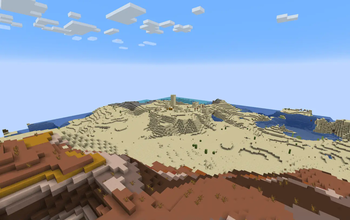
Zoooom – Simple, Configurable Zoom for Minecraft!
Ever wished you could zoom in to get a better look at distant objects? Zoooom is a lightweight mod that adds a simple yet powerful zoom feature to Minecraft! Perfect for scouting terrain, spotting mobs from afar, or just taking in the scenery with more detail.
🔎 Features
Hold-to-Zoom: Press and hold Z to zoom in effortlessly. Configurable Zoom Level: Adjust how far you zoom in with a simple client config setting. Smooth Camera: No extra fluff - enable the smooth camera option for smooth camera movement while zooming.
⚙️ Configuration Options
Customize the zoom level to fit your needs with the client config file:
[general]
  #Zoom distance
  zoomDistance = 0.23
  #Enable smooth camera while zooming
  smoothCameraEnabled = false
Simply tweak the zoomAmount value in the config to increase or decrease the zoom depth. Enable smooth camera while zooming in the config should you wish.
🕹️ How to Use
Press and hold "Z" to zoom in. Release "Z" to return to normal vision. Adjust the zoom level in the config file if needed.
✨ That’s it! ✨ No complicated mechanics - just a simple, effective zoom feature to enhance your gameplay.
- Edition: Minecraft Java
- File type: .jar
- Minecraft versions listed: 1.21.1, 1.21.2, 1.21.3
- How to install: Install the matching mod loader (Forge, Fabric or NeoForge) for your Minecraft version. → Download the .jar. → Put it in the .minecraft/mods folder and launch that loader profile.
- Where to get it: Opens on Modrinth — not every file is mirrored on our own servers.
Install steps are the general flow for this file type — How to install Minecraft Java mods & modpacks walks through it step by step.
- Ships as zoooom-neoforge-1.0.0.jar — drop this file into the mods folder
- Download size: 19 KB
- Download link checked 31 Aug 2026 — working
These come from our own check of the pack file, not from the source page.