Beatiful Keystrokes
Java mod listed for Minecraft 1.21. Downloads from the MC Java Mods app on Android.
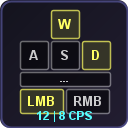
Displays pressed keys (WASD, Space, Shift) and mouse buttons with live CPS counter on a fully customizable HUD.
⬇ Download on Modrinth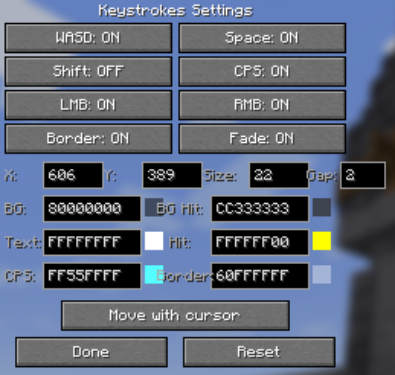
Keystrokes
A lightweight, fully customizable keystrokes mod that displays your pressed keys and clicks per second on the HUD. Perfect for PvP and content creators.
What It Shows
- W A S D — movement keys, light up when pressed
- Space — jump key
- Shift — sneak key (optional)
- LMB / RMB — mouse buttons with live CPS inside each button
- CPS — clicks per second displayed inside the mouse buttons
Full Customization
Press , (comma) to open settings, or use Mod Menu.
Elements
- Toggle each element on/off: WASD, Space, Shift, LMB, RMB, CPS
Colors (HEX ARGB)
- Background color
- Background color when pressed
- Text color
- Text color when pressed
- CPS number color
- Border color
- Live color preview next to each field
Layout
- Position X / Y
- Key size
- Gap between keys
- Border on/off
- Move with cursor — drag the whole widget with your mouse
- Reset button — restore defaults
Keybinds
| Key | Action |
|---|---|
| K | Toggle Keystrokes on/off |
| , | Open settings |
All keybinds are rebindable in Controls settings.
Supported Versions
Fabric: 1.20 — 1.21.11, 26.1
Requirements
- Fabric Loader
- Fabric API
Optional
- Mod Menu (for settings button)
Client-Side Only
No server mod needed. Works on any server.
- Edition: Minecraft Java
- File type: .jar
- Minecraft version listed: 1.21.4
- How to install: Install the matching mod loader (Forge, Fabric or NeoForge) for your Minecraft version. → Download the .jar. → Put it in the .minecraft/mods folder and launch that loader profile.
- Where to get it: Opens on Modrinth — not every file is mirrored on our own servers.
Install steps are the general flow for this file type — How to install Minecraft Java mods & modpacks walks through it step by step.
- Ships as keystrokes-1.0.0-mc1.21.4.jar — drop this file into the mods folder
- Download size: 26 KB
- Download link checked 11 Oct 2026 — working
These come from our own check of the pack file, not from the source page.