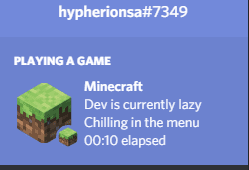
Simple Discord RPC Mod allows you to display Minecraft or a custom Modpack name on your Discord Status, so that other people can see what you are doing. This is useful for modpacks that want to advertise themselves, or for people who simply want a nicer way to show that they are playing Minecraft. This mod works out of the box, but you can customize it to suit your needs.
Features:
- Display details like the world you’re in, dimension, or activity.
- Set personalized large and small icons for your status.
- Automatically updates your Discord status as you play.
- Modify settings directly through the mod’s GUI.
- Enable or disable the Rich Presence feature anytime.
Screenshots:
Simple Discord RPC Mod Download Links
Quick facts
- Edition: Minecraft Java
- File type: .jar
- Minecraft version listed: 1.20.1
- How to install: Install the matching mod loader (Forge, Fabric or NeoForge) for your Minecraft version. → Download the .jar. → Put it in the .minecraft/mods folder and launch that loader profile.
- Where to get it: In MC Java Mods, or directly above on this page.
Install steps are the general flow for this file type — How to install Minecraft Java mods & modpacks walks through it step by step.
Verified by MCModsHub
- Downloads as 27445.mcaddon
- Download size: 699 KB
- Download link checked 25 Sept 2026 — working
- Mirrored on our own servers — the download does not depend on the original host
These come from our own check of the pack file, not from the source page.