
Modset Policy Enforcement (MPE)
Java mod listed for Minecraft 1.17–26.x. Downloads from the MC Java Mods app on Android.
This mod has a new concept of Anti Cheat for Minecraft. Instead of looking if the User does move right it sits on the users PC and looks what mods he has…
⬇ Download on Modrinth
Modset Policy Enforcement (MPE)
Ensure fair play on your Minecraft Fabric server with Modset Policy Enforcement (MPE). This mod introduces a new, advanced technique to detect cheaters, providing robust protection against unauthorized modifications.
Key Features
Client and Server Side Protection
The mod must be installed on both the client and server, ensuring consistent and reliable detection.
Mod Verification
Upon connection, the server verifies if the client has the MPE mod installed. Clients without the mod are automatically rejected.
Mod Scanning
The client sends a list of all active mods to the server when connecting.
Banned Mods Enforcement and Config
The server checks the list of client mods against a configurable banned mods list and prevents connections if any prohibited mods are detected.

- On the server, go to
config/anticheat/banned-mods.txt. - In the config file, enter the mod IDs you want to ban.
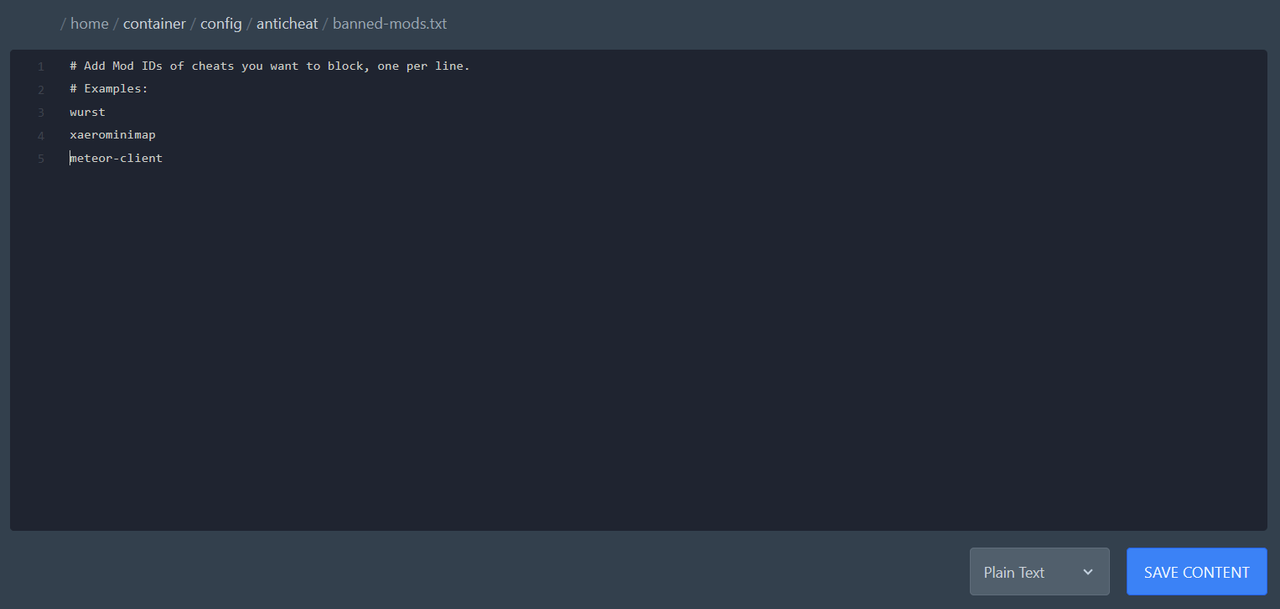
- How to find a mod ID:
- Download the mod you want to ban and rename the file extension from .jar to .zip.
- Open the mod’s ZIP folder (if you cant open it you have extract it first).
- Read the
fabric.mod.jsonfile. - Take the value of the
idfield. Example:{ "id": "meteor-client", "name": "Meteor Client" }→ putmeteor-clientinto the file.
- Each ID must be placed on a new line.
- Edition: Minecraft Java
- File type: .jar
- Minecraft versions listed: 1.17, 1.17.1, 1.18
- How to install: Install the matching mod loader (Forge, Fabric or NeoForge) for your Minecraft version. → Download the .jar. → Put it in the .minecraft/mods folder and launch that loader profile.
- Where to get it: Opens on Modrinth — not every file is mirrored on our own servers.
Install steps are the general flow for this file type — How to install Minecraft Java mods & modpacks walks through it step by step.
- Ships as anticheat-1.0.0.jar — drop this file into the mods folder
- Download size: 14 KB
- Download link checked 11 Oct 2026 — working
These come from our own check of the pack file, not from the source page.