
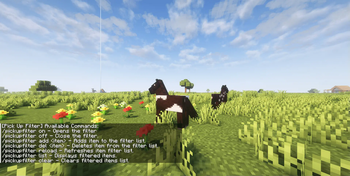

Pick Up Filter (PUF)
Pick Up Filter (PUF) lets you control which items you pick up in Minecraft.






Commands
- Display available commands in the in-game chat:
- /pickupfilter help
- Toggle the filter on or off:
- /pickupfilter on
- /pickupfilter off
- Add or remove filtered items:
- /pickupfilter add minecraft:item_name
- /pickupfilter del minecraft:item_name
- List all filtered items:
- /pickupfilter list
- Clear all filtered items:
- /pickupfilter clear
- Reload the filter configuration:
- /pickupfilter reload
NOTE: When you add or delete anything from filter via in-game chat its reloads automatically.
Contact
- Discord: zuzi
License
This mod is under the [GNU Lesser General Public License, v3.0].
Quick facts
- Edition: Minecraft Java
- File type: .jar
- Minecraft version listed: 1.21.8
- How to install: Install the matching mod loader (Forge, Fabric or NeoForge) for your Minecraft version. → Download the .jar. → Put it in the .minecraft/mods folder and launch that loader profile.
- Where to get it: Opens on Modrinth — not every file is mirrored on our own servers.
Install steps are the general flow for this file type — How to install Minecraft Java mods & modpacks walks through it step by step.
Verified by MCModsHub
- Ships as pickupfilter-v1.0.7-forge-1.21.8.jar — drop this file into the mods folder
- Download size: 44 KB
- Download link checked 31 Aug 2026 — working
These come from our own check of the pack file, not from the source page.