
KeybindingLocker
Java mod listed for Minecraft 1.20. Downloads from the MC Java Mods app on Android.
⬇ Download on Modrinth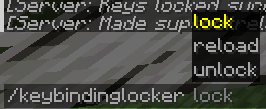
🔒 KeybindingLocker – Server-Controlled Keybind Locking for Fabric
KeybindingLocker is a lightweight Fabric mod designed for server administrators and event organizers who need to remotely lock specific keybind actions on connected clients.
It enables fine-grained control over player inputs by disabling configurable keybinds during events or gameplay scenarios, enhancing server-side control without client-side mod dependency.
✨ Key Features
- ⛔ Server-Side Keybind Locking
Block specific keybind actions like chat (
key.chat), inventory, or other controls based on server configuration.
- 🔄 Real-Time Sync
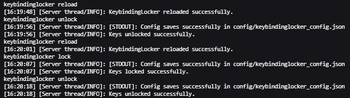
When activated via server commands, all connected clients receive updates and have the matching keys locked immediately.
- 🔧 Simple Configuration
Define which keybind actions are locked through an easy-to-edit config file.
- 🎮 Enhances Custom Gameplay & Events
Ideal for roleplay servers, minigames, or events where player controls must be limited temporarily.
⚙️ Compatibility & Requirements
✅ Mod Loader: Fabric
🧩 Minecraft Versions: Supports 1.20.1 and 1.20.4
📦 Dependencies: Fabric API
🔧 Use Cases
- 🎭 Roleplay servers needing to restrict player UI or chat during scenes
- 🎮 Minigames or custom events requiring temporary disabling of specific controls
- 🛡️ Servers aiming to control player input for balance or narrative reasons
📌 Notes
- Requires both client and server installation for full functionality.
- This mod does not modify vanilla keybind behavior outside the server lock state.
🌐 Source Code & Contributions
This mod is open-source and available on GitHub.
Contributions, bug reports, and feedback are welcome!
- Edition: Minecraft Java
- File type: .jar
- Minecraft version listed: 1.20.4
- How to install: Install the matching mod loader (Forge, Fabric or NeoForge) for your Minecraft version. → Download the .jar. → Put it in the .minecraft/mods folder and launch that loader profile.
- Where to get it: Opens on Modrinth — not every file is mirrored on our own servers.
Install steps are the general flow for this file type — How to install Minecraft Java mods & modpacks walks through it step by step.
- Ships as keybindinglocker-1.0.0+1.20.4.jar — drop this file into the mods folder
- Download size: 224 KB
- Download link checked 1 Nov 2026 — working
These come from our own check of the pack file, not from the source page.